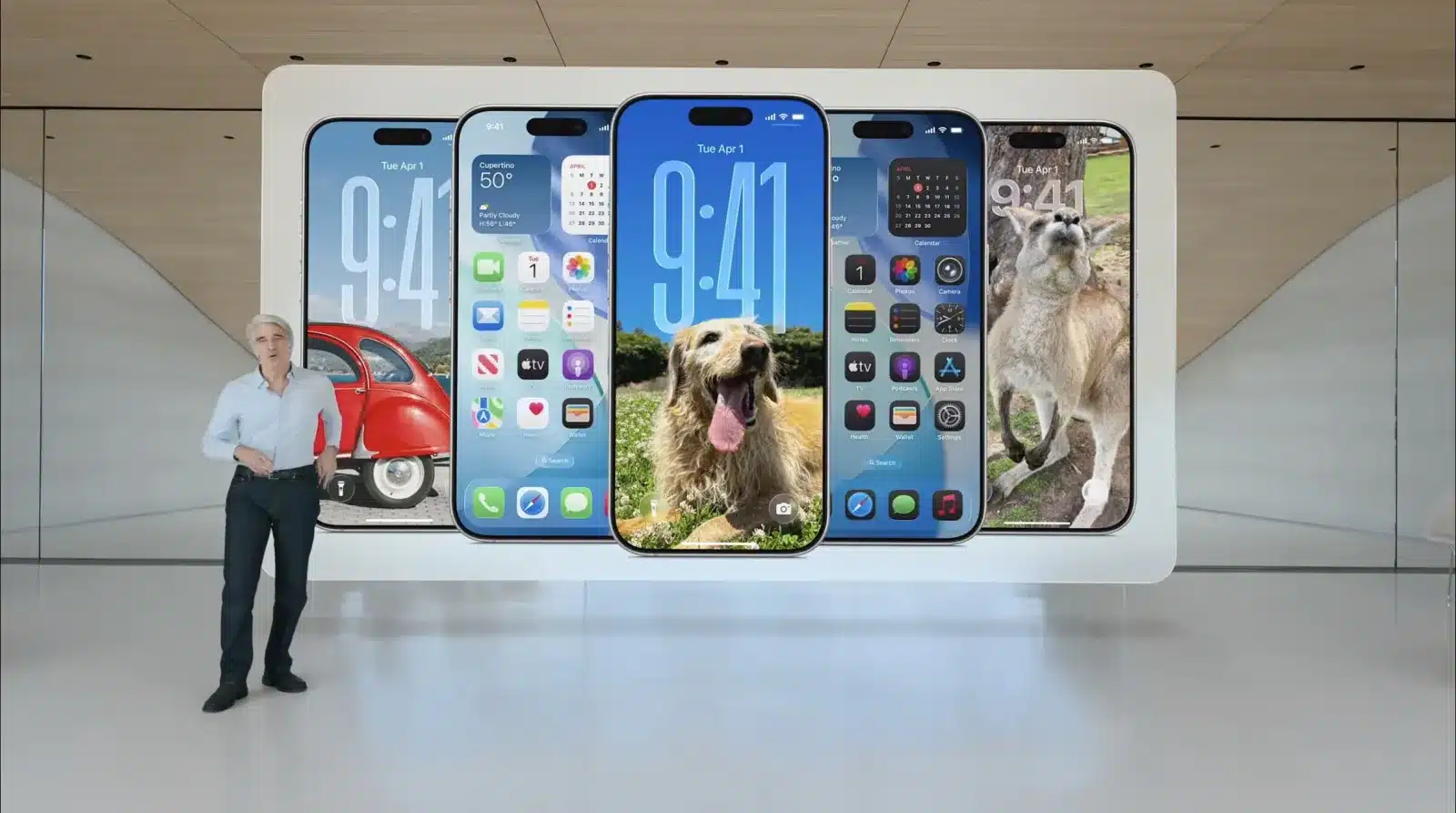
Apple has unleashed the second developer beta of iOS 26, and it’s more than just a stability update. This new build brings a significant visual refresh and a suite of powerful capabilities, transforming the iPhone experience. Developers are now diving into what Apple is calling “Liquid Glass,” a design language that promises to redefine interaction with the device. This update, released a couple of weeks after the initial iOS 26 beta, hints at the future of Apple’s mobile operating system, focusing on clarity, depth, and intuitive user control.
Key Takeaways:
- iOS 26 Beta 2 introduces the “Liquid Glass” design, bringing a fresh, translucent aesthetic across the system.
- The update enhances core apps like Phone and Messages with features like Call Screening, Hold Assist, polls, and custom chat backgrounds.
- Apple Music receives significant upgrades, including AutoMix, Lyrics Translation, Lyrics Pronunciation, and auto-pinning favorite songs.
- CarPlay is fully integrated with the new Liquid Glass design, bringing a modernized infotainment experience to vehicles.
- Apple Intelligence features, such as Live Translation, Image Playground, Genmoji, and an AI-powered Shortcuts app, are further refined.
- The beta includes improvements to Visual Intelligence, allowing users to interact with on-screen content for search and information.
- Accessibility features are expanded with Eye Tracking and improved Personal Voice.
- Safari gains a new Compact Tab View and enhanced tracking prevention.
- The Photos app introduces a tabbed interface, and the Camera app gets a streamlined layout.
- Users can expect improved battery management and more stable performance compared to the first beta.
- The update is now available for developers, with a public beta expected in early July 2025.
- Supported devices include iPhone 13 series and newer, iPhone SE (2nd generation and newer). Older models like the iPhone XR and XS are no longer supported.
- Installation requires 6GB to 8GB of free space and a stable Wi-Fi connection.
A Crystal-Clear Future: The “Liquid Glass” Redesign
The most striking change in iOS 26 Beta 2 is the widespread adoption of the “Liquid Glass” design. This new aesthetic permeates the entire operating system, from the Lock Screen and Home Screen to the Control Center and individual applications. Apple describes it as “beautiful, delightful, and instantly familiar,” aiming to simplify navigation and help users focus on content.
The Liquid Glass design introduces translucent elements that reflect and blur backgrounds, creating a sense of depth and fluidity. App icons have been re-crafted with a layered glass-like appearance, offering new light and dark themes, color-tinted icons, and a clear look. Interface elements like navigation bars, sidebars, card-style menus, notifications, and buttons now feature a more rounded, pill-shaped design, enhancing visual coherence. When scrolling, tab bars collapse, contributing to a truly immersive experience. This visual overhaul is a significant departure from previous iOS iterations, marking the first major design change since iOS 7.
Unveiling the 14 Groundbreaking Features
Beyond the aesthetic revamp, iOS 26 Beta 2 packs a punch with a host of functional improvements and new capabilities. Here’s a detailed look at 14 of the most impactful features:
- Liquid Glass Design: As mentioned, this is the overarching visual theme. It affects everything from the Lock Screen, where the time dynamically adapts to your photo and the surrounding space with a new 3D effect, to updated app icons and simplified controls that keep tools within reach while focusing on content. The system-wide application of Liquid Glass creates a cohesive and visually pleasing experience across all Apple devices.
- Enhanced Phone App Controls:
- Manage Unwanted Calls: Call Screening automatically answers unknown callers, transcribing their name and reason for calling to your Lock Screen, allowing you to decide whether to pick up. This feature aims to significantly reduce distractions from spam and unwanted solicitations.
- Hold Assist: The Phone app can now wait on hold for you when calling customer service lines. Hold Assist will notify you when a live agent is ready to talk, saving valuable time and frustration.
- Messages App Evolution:
- Polls in Messages: Users can now create polls directly within individual or group chats, allowing everyone in the conversation to contribute options and see votes in real-time. This simplifies group decision-making.
- Customizable Backgrounds: Personalize your conversations with new custom backgrounds for chats, adding a unique touch to each message thread.
- Screen New Senders: New screening tools detect spam and allow you to control who appears in your conversations, providing a cleaner and more secure messaging experience.
- Apple Music Gets Smarter:
- AutoMix: This feature uses intelligence to seamlessly mix from one song to the next, like a DJ. It applies time stretching and beat-matching for smooth transitions, enhancing the listening experience.
- Lyrics Translation: Understand the meaning behind your favorite songs with integrated lyrics translation, breaking down language barriers in music appreciation.
- Lyrics Pronunciation: Learn to pronounce lyrics correctly, adding a new dimension to engaging with music.
- Auto-Pin Favorite Songs: This functionality automatically pins your favorite songs, making them easily accessible within the Apple Music interface.
- CarPlay Transformation: The new iOS 26 Liquid Glass design extends to CarPlay, bringing a modernized and visually consistent experience to your vehicle’s infotainment display. This includes support for Live Activities and Tapbacks in messages directly from CarPlay.
- Refined Apple Intelligence Features: Apple Intelligence, Apple’s suite of AI capabilities, sees further refinement in Beta 2:
- Live Translation: This feature is now system-wide, integrated into Messages, FaceTime, and the Phone app, enabling multilingual conversations without needing separate translation services.
- Image Playground: Continued improvements to this tool allow for advanced image generation and manipulation.
- Genmoji: Generate custom emojis with greater precision and creativity.
- AI-Powered Shortcuts App: The Shortcuts app leverages Apple Intelligence for more intelligent suggestions and automation, with pre-programmed shortcuts for tasks like morning summaries or haiku generation.
- Visual Intelligence on Screenshots: For the first time, Visual Intelligence works with screenshots. You can capture a screenshot and immediately use Visual Intelligence to identify objects, text, or elements within the image, then search for more information or take action, leveraging the power of ChatGPT for deeper insights.
- Wallet with Digital ID: Create a digital ID in Wallet using your U.S. passport. This can be used at TSA checkpoints, in apps, and in person. Boarding passes also gain new functionalities, including convenient access to airport maps, luggage tracking via Find My, and shareable Live Activities.
- All-New Games App: A dedicated Games app provides a central hub for everything related to your gaming. Stay updated on all your games, discover new titles your friends are playing, and receive tailored recommendations. Compete with friends in score-based showdowns with Challenges.
- Smarter Maps: Maps now learns your preferred routes and can proactively alert you about significant delays, even before you start your journey. If your routine changes, iPhone adapts to it, ensuring you’re always on the most efficient path. The addition of “Visited Places” allows you to remember and quickly find locations you’ve been, sharing them with a tap.
- Improved Camera and Photos Apps: The Camera app features a cleaner, more intuitive layout, simplifying the photography experience. The Photos app introduces a new tabbed interface, making it easier to navigate between your full library and personalized albums.
- Safari Enhancements: Safari receives a new “Compact” view for the Tab bar, tucking away several settings for a less cluttered Browse experience. Advanced fingerprinting protection is extended to all Browse by default, enhancing user privacy.
- Expanded Accessibility Features:
- Eye Tracking: Users can now choose to use a switch or dwell for making selections, with a new keyboard dwell timer for typing and reduced steps when typing with switches.
- Personal Voice: The Personal Voice feature, which allows users to preserve their voice, is now faster, easier, and creates a smoother, more natural-sounding voice in under a minute, thanks to advances in on-device machine learning. Spanish language support has also been added.
- System-Wide Stability and Performance: While not a “feature” in the traditional sense, Beta 2 brings notable improvements to overall system stability and performance, addressing many of the bugs and occasional lag experienced in the initial beta. This makes the experience more reliable for developers testing the new functionalities.
Compatibility and Installation
For those eager to experience iOS 26 Beta 2, it’s crucial to understand compatibility and the installation process.
Supported Devices: iOS 26 is compatible with the following iPhone models:
- iPhone 13 series (iPhone 13, 13 mini, 13 Pro, 13 Pro Max)
- iPhone 14 series (iPhone 14, 14 Plus, 14 Pro, 14 Pro Max)
- iPhone 15 series (iPhone 15, 15 Plus, 15 Pro, 15 Pro Max)
- iPhone 16 series (iPhone 16, 16 Plus, 16 Pro, 16 Pro Max, 16 Air)
- iPhone 17 series (iPhone 17, 17 Pro, 17 Pro Max, 17 Air)
- iPhone SE (2nd generation and newer)
Notably, older models like the iPhone XR and iPhone XS lineup are no longer supported with iOS 26.
How to Install iOS 26 Beta 2:
- Backup Your iPhone: Before installing any beta software, it is strongly recommended to perform a full backup of your device via iCloud or Finder/iTunes to prevent data loss. Beta software can be unstable.
- Enroll in Apple Developer Beta Program: While a paid developer account was historically required, Apple has made developer betas more accessible. You can sign in with your Apple ID through the free Apple Beta Software Program.
- Enable Beta Updates: On your iPhone, go to Settings > General > Software Update > Beta Updates. Select the “iOS 26 Developer Beta” option. Ensure your iPhone is signed in with the Apple ID used for the Apple Developer website.
- Download and Install: Go back to Software Update, and the iOS 26 Beta 2 update should appear for download. Tap “Download and Install.” The update requires 6GB to 8GB of free space and a stable Wi-Fi connection. Ensure your battery is at least 50% charged or your device is plugged in.
Known Considerations in Beta 2: As with any beta software, some issues might persist. Users have reported instances of:
- Temporary battery drain or overheating, especially in the initial hours after installation, as background tasks complete.
- Minor graphical glitches or lag when interacting with the new Liquid Glass effects, particularly with rapid movements.
- Certain app incompatibilities, especially with banking or security-sensitive applications, as developers work to update their apps for iOS 26.
- Specific elements on the Lock Screen or in the Apple TV app occasionally displaying incorrectly.
These are typical of early beta releases, and Apple will address them in subsequent updates. For daily drivers, it is generally advised to wait for the public beta or the final release for greater stability.
The release of iOS 26 Beta 2 signals that Apple is making swift progress on its next major mobile operating system. The focus on a cohesive new design, coupled with significant functional upgrades across core applications and the further integration of Apple Intelligence, paints a clear picture of Apple’s vision for the future of the iPhone. While the public beta is expected in early July 2025, and the final version likely in mid-September alongside the iPhone 17 series launch, developers now have a more refined build to test the boundaries of what iOS 26 can offer. The Liquid Glass design is not just a visual treat; it’s a foundation for a more intuitive and integrated user experience.
FAQ Section
Q1: What is “Liquid Glass” design in iOS 26?
A1: Liquid Glass is a new visual aesthetic in iOS 26 that introduces translucent, layered elements with optical qualities of glass. It brings a fresh, modern look to the Lock Screen, Home Screen, Control Center, and apps, creating a sense of depth and fluidity with blurred backgrounds and rounded interface elements.
Q2: When was iOS 26 Beta 2 released?
A2: iOS 26 Beta 2 was released on Monday, June 23, 2025, for developers.
Q3: How many new features are in iOS 26 Beta 2?
A3: iOS 26 Beta 2 introduces numerous refinements and features. Our report details 14 significant new or improved functionalities.
Q4: Can I install iOS 26 Beta 2 on my iPhone XR?
A4: No, iOS 26 does not support the iPhone XR or iPhone XS lineup. Compatible devices include iPhone 13 series and newer, as well as the iPhone SE (2nd generation and newer).
Q5: Is iOS 26 Beta 2 stable enough for daily use?
A5: As a developer beta, iOS 26 Beta 2 is not fully stable. It may contain bugs, performance issues like battery drain or overheating, and app incompatibilities. It is generally recommended to install beta software on a secondary device or wait for the public beta or final release for a more stable experience.
Q6: What are the main improvements in the Phone and Messages apps in iOS 26 Beta 2?
A6: The Phone app gains Call Screening to manage unwanted calls and Hold Assist to wait on hold for you. The Messages app now supports creating polls within chats, customizable backgrounds for conversations, and improved tools for screening unknown senders.
Q7: How does Apple Music change in iOS 26 Beta 2?
A7: Apple Music receives AutoMix for seamless song transitions, Lyrics Translation to understand song meanings, Lyrics Pronunciation, and the ability to auto-pin favorite songs for quick access.
Q8: What is Apple Intelligence, and how is it improved in this beta?
A8: Apple Intelligence refers to Apple’s integrated AI capabilities. In Beta 2, features like Live Translation are now system-wide, Image Playground sees continued refinement, Genmoji creation is improved, and the Shortcuts app becomes more AI-powered with intelligent suggestions.
Q9: Will iOS 26 Beta 2 make my CarPlay experience better?
A9: Yes, the new Liquid Glass design of iOS 26 is integrated into CarPlay, modernizing its appearance and bringing features like Live Activities and Tapbacks directly to your vehicle’s display.
Q10: When can I expect the public beta of iOS 26?
A10: Apple is expected to release the public beta of iOS 26 in early July 2025.
Q11: What storage space is needed to install iOS 26 Beta 2?
A11: You will need 6GB to 8GB of free space on your iPhone to download and install iOS 26 Beta 2.
Q12: How do I report bugs in iOS 26 Beta 2?
A12: Developers and beta testers can report bugs and provide feedback through Apple’s Feedback Assistant application.