In a quiet yet significant shift, Microsoft has introduced a change to one of Windows’ most infamous features: the Blue Screen of Death (BSOD). With the arrival of Windows 11, the long-standing blue error screen – an emblem of system crashes and critical failures for decades – is being replaced by a new, green-tinted equivalent. This change, while seemingly cosmetic, signals a notable shift in how Microsoft visually communicates system failures to its users.
Key Takeaways:
- The Blue Screen of Death (BSOD), a long-standing symbol of Windows system crashes, is being replaced.
- Windows 11 now displays a Green Screen of Death (GSOD) for critical system errors.
- This visual update aligns with Microsoft’s evolving design philosophy for its operating system.
- The technical information displayed on the screen remains largely unchanged.
- The BSOD’s legacy spans from early Windows versions and remains an iconic image in popular culture.
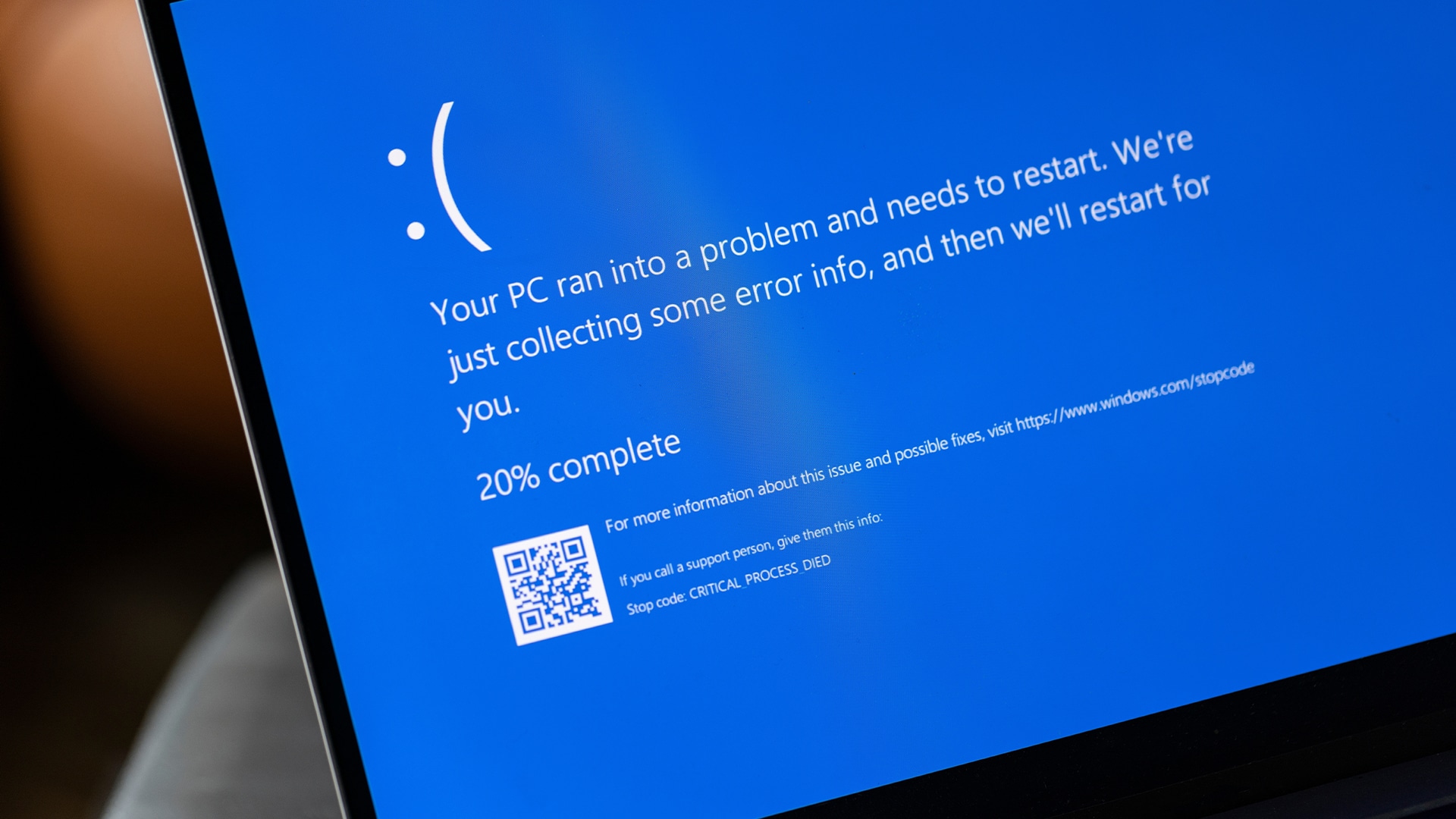
For years, the sight of the blue screen with its stark white text, often paired with a cryptic error code and, more recently, a sad face emoji, was a sure sign that something had gone terribly wrong. It was a frustrating experience that often resulted in a forced reboot and, with it, the potential loss of unsaved work. Over time, the BSOD cemented its place in popular culture, becoming synonymous with computer malfunctions.
A Legacy of Blue: The BSOD’s History
The Blue Screen of Death has been a defining feature of Windows since its early days. Though it was never officially dubbed the “Blue Screen of Death” by Microsoft, the name quickly became widely used across tech communities and among everyday users.
Its origins go back to Windows 3.x, where a similar blue screen appeared to signal a fatal application error (UAE). But it was with Windows NT that the version of the BSOD that became truly iconic emerged, featuring stop error codes and memory dump information. This version of the BSOD became standard across various Windows releases, including Windows 95, Windows 98, Windows 2000, Windows XP, Windows Vista, Windows 7, Windows 8, Windows 8.1, and Windows 10.
In the earlier days of Windows, especially in the Windows 9x era, the BSOD was a much more frequent sight. It pointed to issues ranging from faulty hardware drivers to problematic software installations. However, as Windows matured, so did its stability, making the BSOD a less frequent but still significant event. Over the years, Microsoft started to include more technical information on the screen to help users and IT professionals diagnose the root cause of the crash, including stop codes, error module details, and memory addresses.
Windows 8 introduced a slightly more user-friendly version of the BSOD, replacing the complex jargon with a simpler message and adding a large, unhappy emoticon (“:(“). This was an attempt to make the experience less intimidating for everyday users, while still offering the necessary diagnostic data for those who needed it. This design carried over into Windows 10.
The Shift to Green in Windows 11
While the transition to a green error screen might seem surprising, it’s not entirely new. Windows Insider builds (the pre-release versions of Windows) have used the Green Screen of Death (GSOD) for a number of years. This green screen was specifically employed to distinguish errors occurring in unstable, development builds from those in stable, public releases. It acted as a visual cue for Microsoft engineers and testers, alerting them that the error originated in a version of Windows still in active development.
With Windows 11, this GSOD is now the default for critical errors in stable, public builds. While Microsoft hasn’t gone into great detail about the reasoning behind this change, the color shift seems to be in line with the overall aesthetic overhaul of Windows 11. The operating system features a more modern, rounded interface, a centered Start menu, and updated icons. Switching from the stark blue to a more subdued green for error messages could be part of the broader effort to provide a more cohesive and visually appealing user experience—even in moments of system failure.
Functionally, the Green Screen of Death in Windows 11 serves the same purpose as its blue predecessor. It still displays important diagnostic information, such as a stop code, a QR code for troubleshooting, and a mention of the memory dump process. The goal remains unchanged: to alert users to a critical system error, protect against further data corruption, and provide diagnostic details. Users are still encouraged to note down the stop code or scan the QR code to explore potential solutions via Microsoft’s support or online communities.
Impact and User Perception
The Blue Screen of Death has long been an iconic feature for Windows users. Its presence evokes a certain feeling—usually one of mild panic or frustration. The retirement of this familiar blue screen is bound to stir up some nostalgia for many, while others may welcome the change as a sign of progress, a chance to leave behind a symbol of frustration.
Discussions on platforms like Reddit, Quora, and tech forums have revealed a mix of reactions. Some users have taken to humor, creating memes and jokingly referring to the “Green Screen of Death.” Others, particularly those who have long been accustomed to the blue screen, admit to a moment of disorientation, but generally agree that the functionality remains the same. Most recognize the color shift as being primarily aesthetic, without altering the core experience.
One feature that has drawn praise is the addition of a QR code, which was introduced in recent Windows versions and now appears on both the BSOD and the GSOD. Scanning the QR code with a smartphone typically redirects users to a specific Microsoft support page related to the displayed error code. This addition streamlines the troubleshooting process, offering users a quick path to potential solutions without having to manually input complex error codes.
The Future of Error Reporting
The move to a green screen in Windows 11 signals Microsoft’s ongoing efforts to modernize how it presents system information to users. While encountering a critical error screen is never an ideal experience, the design changes reflect an effort to soften the visual impact of what is, fundamentally, a negative event.
It’s also worth noting that, as time has gone on, operating systems—Windows included—have improved significantly in terms of stability and error handling. Issues such as driver compatibility and hardware problems have become less frequent, meaning that the average user is less likely to encounter critical system crashes. While the Green Screen of Death still signifies a serious issue, it’s increasingly becoming a rarer sight for users on stable, well-maintained systems.
The GSOD, like its blue predecessor, still serves its critical purpose: alerting users to a serious system error that needs immediate attention to prevent further damage or data loss, while also providing diagnostic information. The color change is more of a visual update, bringing Windows 11 in line with its new design, rather than a substantial overhaul in how the operating system handles or reports system failures. For millions of Windows users worldwide, a system crash will now be greeted with a green screen—a small but notable shift in the story of Windows.
Frequently Asked Questions (FAQs)
Q1: What is the Blue Screen of Death (BSOD)?
A1: The Blue Screen of Death (BSOD) is a term used for a critical error screen displayed by Microsoft Windows when a fatal system error occurs. The system halts to prevent data corruption and typically displays a stop code, along with diagnostic information.
Q2: Why is Microsoft changing the Blue Screen of Death to green in Windows 11?
A2: The change is part of Microsoft’s broader visual refresh for Windows 11. The green screen, known as the Green Screen of Death (GSOD), has been used in pre-release builds for years, and its adoption in stable versions of Windows 11 is aligned with the operating system’s overall modern aesthetic.
Q3: Does the Green Screen of Death (GSOD) in Windows 11 mean something different than the BSOD?
A3: No, the Green Screen of Death (GSOD) in Windows 11 serves the same purpose as the Blue Screen of Death (BSOD). It indicates a critical system error that halts the operating system. The color change is purely aesthetic.
Q4: What information does the Green Screen of Death (GSOD) display?
A4: The Green Screen of Death in Windows 11 displays diagnostic information similar to the BSOD, including a stop code, a QR code for troubleshooting, and a message about the memory dump process.
Q5: How can I troubleshoot a Green Screen of Death (GSOD) error?
A5: To troubleshoot a GSOD error, note the stop code or scan the QR code. The QR code links to a relevant Microsoft support page. You can also search for the stop code online or consult Microsoft’s support documentation for further assistance.