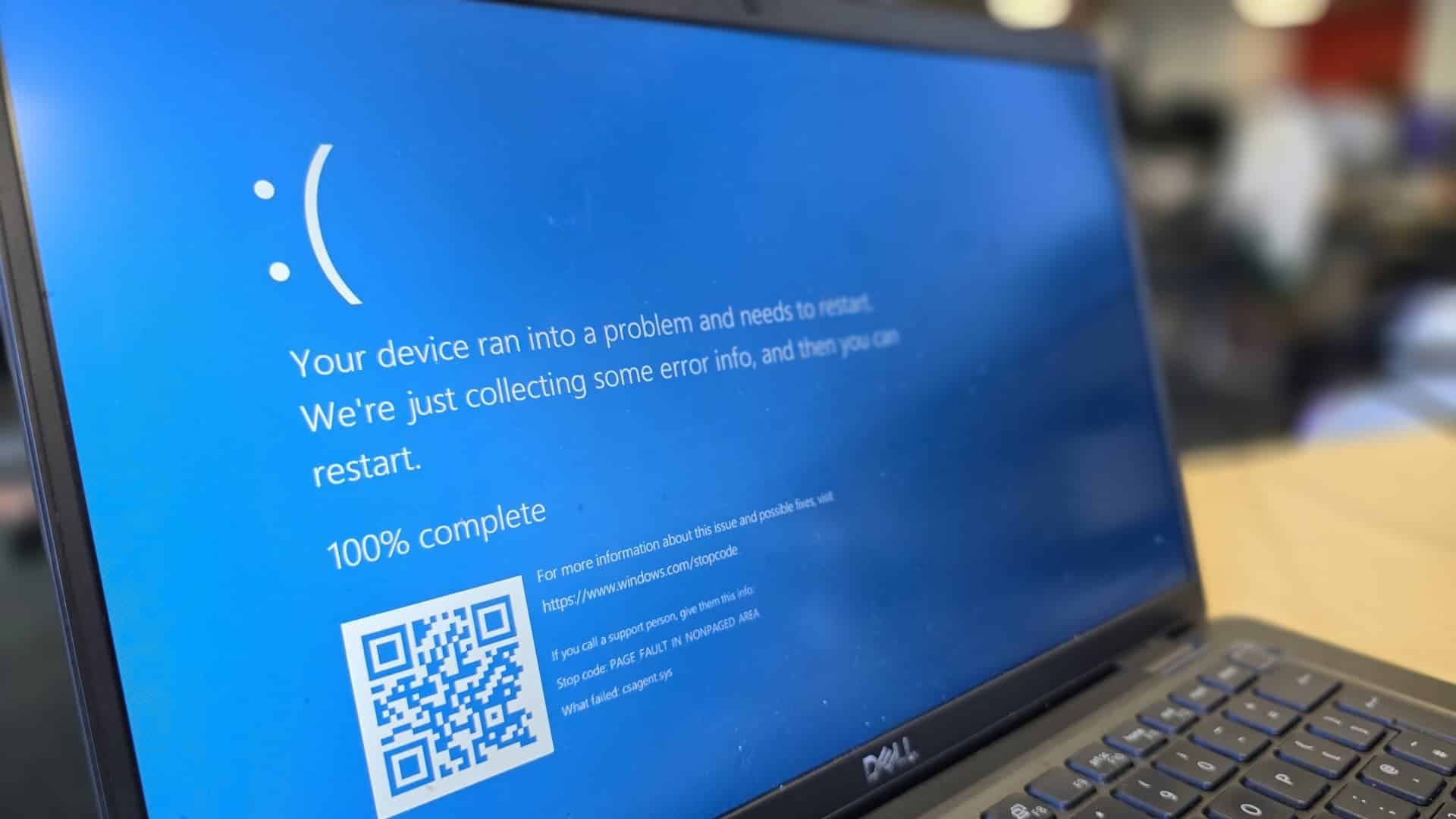
Microsoft has recently rolled out a surprising visual update to its Windows operating system, replacing the iconic “Blue Screen of Death” (BSOD) with a sleek new black error screen. It’s a subtle yet symbolic change—and it’s turning heads. This update is part of the broader “Windows Resiliency Initiative,” aimed at enhancing system stability and recovery. Announced Thursday, June 26, the news has sparked an eclectic mix of responses from across the tech community, drawing in long-time Windows veterans and IT professionals alike.
Key Takeaways:
- The traditional Blue Screen of Death (BSOD) is being replaced by a black screen in Windows 11.
- This update is a component of the “Windows Resiliency Initiative,” which targets improved security and recovery tools.
- Microsoft says the new black screen offers better readability and fits the updated Windows 11 aesthetic.
- Error messages will now display clearer stop codes and driver info, aiding faster diagnostics.
- The change comes in the wake of the 2024 CrowdStrike outage that highlighted flaws in the BSOD’s communication.
- User reactions are split—some appreciate the clarity, others miss the legacy blue screen.
- The update will roll out later this summer, along with a new “Quick Machine Recovery” feature.
For nearly four decades, the Blue Screen of Death has been the dreaded symbol of system failure. It had a certain notoriety, with its stark blue backdrop and cryptic white text, signaling that your PC had hit a wall and needed a restart. Now, with this redesign, Microsoft isn’t just repainting the surface. They’re rethinking how these crash moments communicate with users.
According to David Weston, Vice President of Enterprise and OS Security at Microsoft, the overhaul centers on improving clarity. “We want to help people understand what went wrong without needing to be an expert,” Weston explained. The new interface displays clearer stop codes and relevant driver information right up front. It’s all about reducing the detective work.
This change isn’t happening in a vacuum. The tipping point may well have been the 2024 CrowdStrike crash. Millions of machines bricked simultaneously, with blue screens flashing everywhere—even on billboards in Times Square. The fallout revealed just how limited and visually jarring the BSOD had become. Microsoft is using that moment as a pivot, framing the black screen as a smarter, calmer alternative.
Historically, the BSOD became a staple through decades of Windows versions—from 3.1 and 95, all the way through XP and beyond. And though its appearance evolved slightly, its core design never strayed far from the somber blue tone. So yes, there’s bound to be some nostalgia. For many, it was the unmistakable sign that something had gone wrong, and ironically, that familiarity offered a strange sort of comfort.
But design matters. The new black screen is meant to sync with Windows 11’s darker, more refined aesthetic. Microsoft says it’s about consistency, readability, and ease of use. They want the experience of troubleshooting to be less alienating, more intuitive.
Public opinion so far? Mixed. On social media and forums like Reddit and X (formerly Twitter), some users are genuinely excited. “It looks way cleaner,” one user wrote. “I can finally see what actually went wrong without squinting at outdated text.” Others are more skeptical. One post summed it up: “Why fix what isn’t broken? The blue screen is iconic.”
And then there are those in the middle—who welcome the clarity but question whether the color change was necessary. “Couldn’t they just keep the blue and update the text?” someone mused. It’s a fair point. After all, Microsoft once tested a green version for insider builds. But this marks the first time the shift is going mainstream.
More than just a visual refresh, Microsoft is also rolling out “Quick Machine Recovery.” It’s designed to restore unbootable systems quickly, minimizing downtime after a crash. Think of it as a way to get users back on their feet faster, without needing deep technical intervention. This feature is expected to launch alongside the black screen later this summer.
Of course, this change is just one piece of a broader strategy. Microsoft is phasing out Windows 10 support by October 14, 2025. For those reluctant to upgrade, the company is offering Extended Security Updates—though it won’t be free. Meanwhile, the Microsoft 365 suite is getting smarter, thanks to Copilot, and the company is fine-tuning licensing models across its Cloud Solution Provider program.
Even developers are seeing big changes. At the Build 2025 conference, Microsoft introduced Windows AI Foundry (formerly Copilot Runtime), plus a suite of new APIs and SDKs for building AI-powered applications. They also open-sourced the Windows Subsystem for Linux (WSL), making it even easier to blend Linux environments into Windows.
Ultimately, swapping out the blue screen may feel like a small tweak. But in many ways, it’s emblematic of something larger—Microsoft reshaping how users engage with error, failure, and recovery in a world that’s becoming more resilient, more connected, and yes, a bit more stylish.
FAQ
Q1: What is the “Blue Screen of Death” (BSOD) and why is Microsoft changing it?
A1: The BSOD is a Windows error message displayed during critical system failures. Microsoft is updating it to a black screen to improve clarity, align with modern design, and streamline recovery as part of its “Windows Resiliency Initiative.”
Q2: When will the new black error screen be rolled out?
A2: The black screen is expected to be released later this summer with a broader Windows 11 update.
Q3: What improvements does the new screen offer?
A3: It presents clearer stop codes and faulty driver info upfront, simplifying the troubleshooting process.
Q4: Will older Windows versions also change?
A4: No, the change applies only to Windows 11. Windows 10 and earlier versions will retain the blue screen.
Q5: What is “Quick Machine Recovery”?
A5: It’s a new feature that helps systems recover from boot failures quickly, reducing user downtime after a crash.