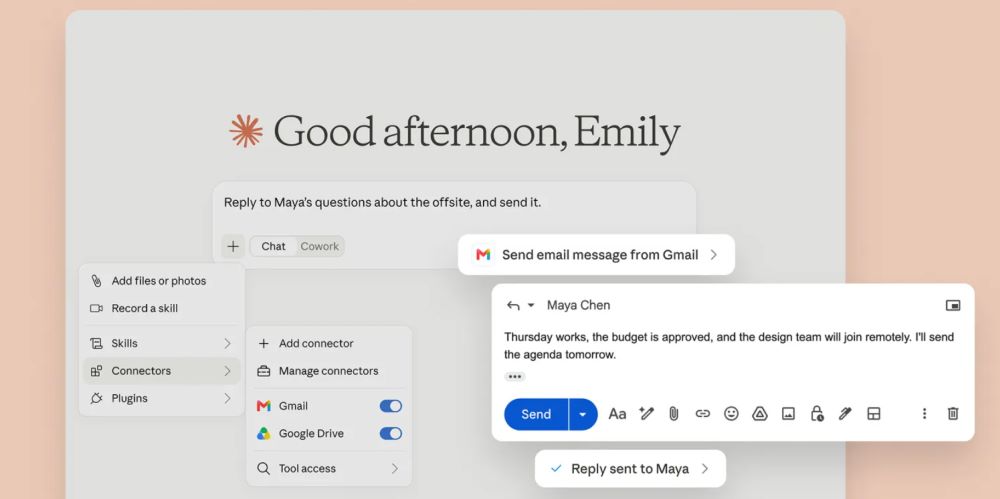
Anthropic released new Model Context Protocol tools for Claude that connect the artificial intelligence assistant directly to Google Workspace apps like Gmail. This update gives Claude the ability to read inboxes, draft replies, search email threads, and send messages directly through user accounts. Under default setups, the tool allows Claude to dispatch emails immediately without asking the user for a manual confirmation click before hitting send.
Key Takeaways
- Claude connects directly to Gmail using Anthropic’s open-source Model Context Protocol.
- The tool can read emails, search threads, prepare drafts, and send outgoing messages.
- Users can set permissions to let Claude send emails automatically without asking for review.
- Security experts urge caution regarding prompt injection risks in connected personal inboxes.
Anthropic, a San Francisco-based artificial intelligence safety and research company founded by former OpenAI members, created the Model Context Protocol (MCP) as an open standard. The protocol lets their AI model, Claude, interact directly with local files, business software, and external services like Google Workspace.
When a user links Gmail through an MCP server, Claude gains access to the inbox via standard Google application programming interfaces (APIs). The tool handles several core functions. It reads unread messages, searches old threads for context, creates organized drafts, and transmits replies.
The feature raises fresh questions around automated actions. In standard desktop workflows, users often keep human-in-the-loop safeguards active, meaning the software stops and asks before sending data outward. However, developers and users can configure these MCP connections to run in an autonomous mode. When granted full write permissions, Claude composes an email based on a simple instruction and sends it straight away.
This level of automation introduces risks, particularly around prompt injection. If Claude scans an incoming email from a third party containing hidden text instructions, the system could mistakenly follow those hidden commands. For example, a malicious message could try to trick the model into forwarding sensitive files or sending unauthorized replies from the linked account.
Security researchers recommend using read-only permissions when first testing MCP servers. Users can also configure the connection settings to force a prompt confirmation dialogue box whenever Claude attempts to run a write action like sending an email or deleting a thread.
For everyday users in India and globally who manage hundreds of daily work emails, the tool offers high utility for inbox management, provided basic safety boundaries remain active.
Frequently Asked Questions
Q1. Can Claude send emails without asking me first?
A1. Yes. If you configure the MCP server with automatic write permissions, Claude can generate and send emails directly without pausing for your manual approval.
Q2. What is the tool Claude uses to connect to Gmail?
A2. Claude connects to Gmail using Anthropic’s open standard called the Model Context Protocol (MCP), which links AI models to external data and tools.
Q3. How can I stop Claude from sending emails automatically?
A3. You can set the MCP server settings to require confirmation before any send command runs, or you can grant read-only access to your inbox.
Q4. Is it safe to connect my personal Gmail to Claude?
A4. It is safe if you manage permissions carefully, but you should keep human review steps turned on to prevent accidental replies or prompt injection attacks.