Microsoft just announced a bunch of Edge updates. Now, AI is built right into the browser for both desktop and mobile. No more separate Copilot Mode. Instead, features like multi-tab analysis and long-term memory are part of the main experience. If you use Android or iOS, you finally get tools that were only on desktop before. You can talk about what’s on your screen using voice and vision features.
Key Takeaways
- Multi-tab analysis: Copilot reads all your open tabs. It compares info or summarizes details, so you don’t have to keep switching.
- Mobile parity: Edge on your phone now supports Voice and Vision. You can interact with what’s on your screen without using your hands.
- Redesigned start: There’s a new tab page and the Journeys tool on every platform. These help you organize your past research.
- Student tools: The new Study and Learn mode makes interactive quizzes and flashcards from whatever reference pages you have open.
- Audio summaries: Desktop users can convert open web pages into audio podcasts for listening on the go.
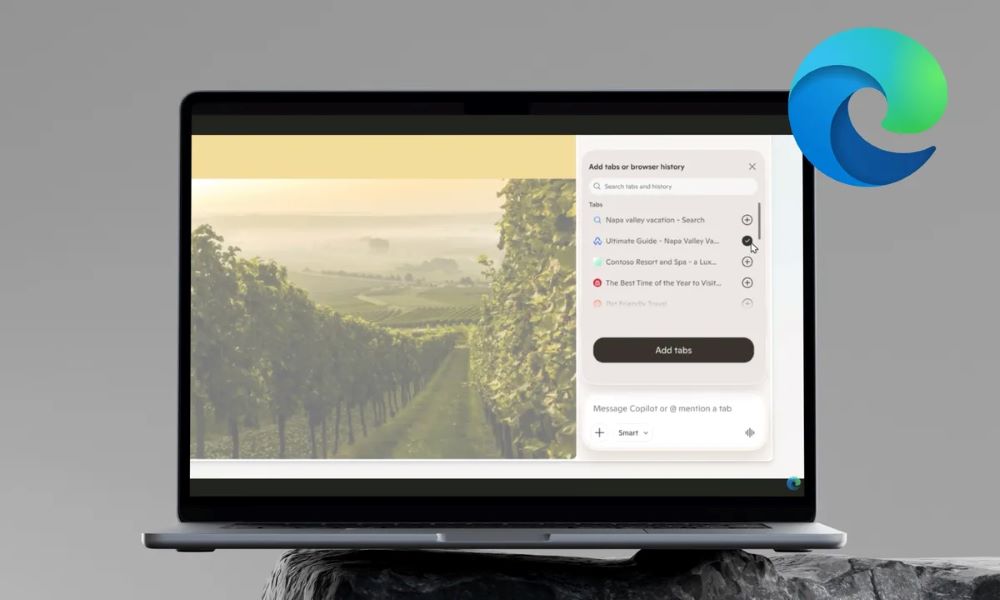
The update introduces agentic AI capabilities that allow the browser to understand context across a series of open windows. For instance, if a user has multiple travel or shopping sites open, they can ask the assistant to generate a comparison table or highlight the best prices across those specific tabs. This change moves the AI from a side panel into a functional layer that understands the entire browsing session as one project.
Mobile users see significant changes with the addition of Vision and Voice features. By granting permission, a person can share their phone screen with the assistant and talk through what they see. This allows for natural conversation while browsing, where the user can ask for explanations or help with decisions without typing prompts. Microsoft has added visual cues to indicate when the system is listening or viewing the screen to maintain transparency.
Productivity for students and professionals has also received attention. The new Study and Learn mode, accessible from the corner of the new tab page, breaks down complex topics into guided sessions. It can automatically generate quizzes to test a person’s knowledge of the material they are currently reading. Additionally, a new Writing Assistant helps users generate or rewrite text drafts for clarity and tone directly within the browser.
For those who prefer audio content, Edge on desktop now supports a feature that turns open tabs into podcasts. This allows users to listen to long articles or research papers using natural-sounding voices. The Journeys feature also makes its way to mobile, automatically grouping browsing history into meaningful topics so users can resume work where they left off.
FAQs
Q1. How does the multi-tab analysis work in the new Edge update?
A1. The assistant can now access the content of all currently open tabs to answer questions. If you ask it to compare products or summarize a topic, it pulls data from every active page instead of just the one you are currently viewing.
Q2. Are the new Vision and Voice features available on all mobile devices?
A2. These features are rolling out to the Edge app on Android and iOS. Users must give explicit permission for the assistant to see their screen or access the microphone before these tools can be used.
Q3. What is the Study and Learn mode in Microsoft Edge?
A3. This is a dedicated tool for students that uses AI to create flashcards and interactive quizzes based on the web pages they are using for research. It helps in breaking down difficult subjects into manageable study sessions.
Q4. Does the assistant remember my past searches and conversations?
A4. Yes, Microsoft has introduced long-term memory and the ability for the assistant to access browsing history. This allows it to provide more relevant answers based on your previous activity, though this requires user consent and can be managed in the settings.
Q5. Can I still use the browser if I do not want these AI features?
A5. While the AI tools are built into the interface, most advanced capabilities like screen sharing and history access are optional and require you to grant permission before they activate.