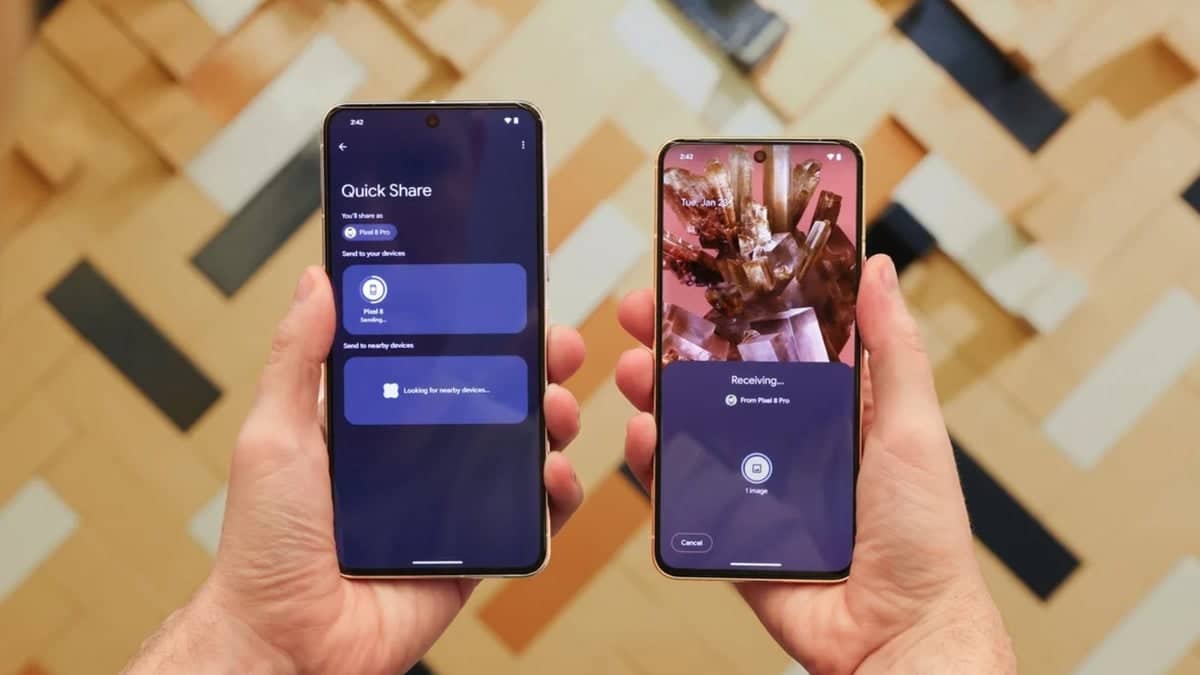
Google is developing a system-level tool for Android 17 that allows users to share files by simply tapping two phones together. This new tool, found in recent software code, works much like the contact sharing and file transfer system used on iPhones. The feature aims to make moving photos, videos, and contact cards faster by removing the need to search through a list of nearby devices.
Key Takeaways:
- Google’s TapToShare service is being integrated into the core of Android 17.
- This feature employs NFC to initiate a connection and Quick Share to transfer data.
- The same system is under development by Samsung for its One UI 9 software.
- The most recent updates enable Galaxy S26 users to perform file sharing with users of Apple devices.
- This feature is anticipated to function with a multitude of different smartphone brands that operate on Android.
TapToShare is a new service that has been discovered in the Android 17 beta and in the code for Google Play Services. This service uses Near Field Communication technology to send and receive data between two devices that are in close proximity to each other. When two devices touch, Quick Share is activated to transfer the data. This is designed to alleviate the process of selecting the data to be transferred and waiting for a target device to appear.
Samsung was the first to implement a similar feature in its One UI 8.5 software, and now with One UI 9, it appears Samsung and Google are collaborating to make TapToShare a default feature across all smartphones. Unlike most of Samsung’s software features that are exclusive to Samsung devices, this one will be available to all devices that run the new Android operating system. This will allow TapToShare to work across different brands, so even a Pixel device will be able to send data to a OnePlus or Xiaomi device just by tapping the devices together.
Sharing Across Different Brands
Previously, sharing files from an Android phone to an iPhone was next to impossible, but thanks to the Samsung Galaxy S26 series, this is no longer an issue. It is now possible to send files to iPhones and Macs using Quick Share, but only if the Share with Apple devices option is enabled from the settings menu. Moreover, this only works if the receiving iPhone has their AirDrop settings to everyone.
Android 17 is expected to bring more features that ease file sharing between different phone brands. Android 17 is expected to include the tap-to-share functionality in its core software which will allow users to share files with different phone brands. Now, users will be able to share files with others without having to worry about their friend’s phone being an different brand.
Setup and Security
For this particular function to work, both users must have their screens unlocked. Additionally, users must have their visibility settings available and unlocked. An NFC opening function discourages accidental file sharing with nearby people. After the prompt, the actual transfer occurs via a rapid wireless connection, allowing even large video files to be transferred quickly.
More information will likely come from Google during their official software launch which will happen later this year. Users with Samsung devices may experience this even sooner as the company is wrapping up their own software testing.
Related FAQs
Q1: How do I use the tap to share feature on Android?
A1: You select the file you want to send and bring your phone close to the other person’s phone. When the NFC chips touch, a prompt appears on the screen to start the transfer through Quick Share.
Q2: Is this feature only for Samsung Galaxy phones?
A2: No. While Samsung is testing it in One UI 9, Google is also building it into the Android 17 code. This means it should work on most new Android phones regardless of the manufacturer.
Q3: Can I share files with an iPhone using this method?
A3: Samsung Galaxy S26 users can already share with iPhones using a special Quick Share setting. The upcoming Android 17 feature aims to make this type of sharing more common across all devices.
Q4: Does it require an internet connection?
A4: No. Tap to share uses NFC and local wireless connections like Wi-Fi Direct or Bluetooth. You do not need mobile data or a Wi-Fi router to send files between the two phones.