WhatsApp has officially introduced a fresh set of celebratory features to welcome 2026, timed carefully for what is consistently its busiest day of the year. As the clock ticks toward New Year’s Eve, the Meta-owned messaging platform prepares for a massive spike in activity. On an average day, WhatsApp already processes more than 100 billion messages and around 2 billion calls globally, and those figures climb sharply as people connect across time zones to send greetings, photos, and last-minute plans.
This latest update leans heavily into interactive media and group coordination. It brings visual enhancements to video calls, expands creative options for Status updates, and adds tools that make organizing New Year gatherings a little less chaotic. Alongside the festive additions, WhatsApp has also outlined several upcoming features for 2026, including stronger account protection and early previews of AI-powered tools.
Key Takeaways
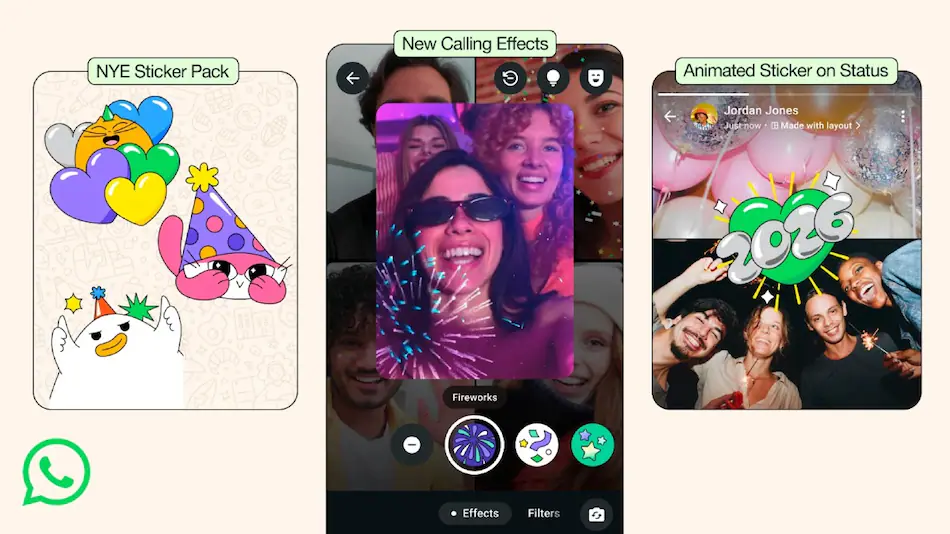
- Festive Effects: Video calls now include real-time animations such as fireworks and confetti.
- Animated Status: Animated stickers are available for Status updates, adding more personality to greetings.
- Planning Tools: Groups can create pinned events, manage RSVPs, and use polls for decisions.
- 2026 Vision: Usernames and Meta AI image editing tools are expected later in the year.
Interactive Celebrations and Smarter Group Planning
To set the mood for the New Year, WhatsApp has released a dedicated 2026 sticker pack and reintroduced animated confetti reactions within chats. When a user reacts to a message with the confetti emoji, the chat briefly fills with a colorful animation. It is a small detail, but it does make conversations feel more festive, especially in busy group chats where messages tend to fly by quickly.
For people hosting or attending New Year’s gatherings, WhatsApp has also refined its group coordination features. Users can now create specific Events directly inside a group chat. These events can be pinned to the top, which helps prevent important details from getting buried under casual conversation. Participants can respond with RSVPs, and hosts can get a clearer picture of who is actually coming. The built-in Polls feature continues to play a role here too, helping groups settle debates about food, venues, or even what time everyone should meet.
Safety has not been overlooked either. During late-night celebrations, WhatsApp continues to recommend its Live Location feature as a way for friends and family to keep track of one another while traveling. It is not a new tool, but during holidays like this, it feels particularly relevant, especially when people are moving between venues or heading home late.
Future Roadmap: Usernames and AI Tools
Looking beyond the holiday updates, WhatsApp has shared hints of more substantial changes planned for later in 2026. One of the most talked-about additions is the Username Reservation System, currently spotted in beta versions of the app. This feature will allow users to choose a unique username, similar in concept to platforms like Instagram.
Once it is fully rolled out, people will be able to search for and message others using usernames instead of phone numbers. The phone number will still exist behind the scenes for verification, but it will no longer need to be shared openly. From a privacy standpoint, this could be a meaningful shift, especially for users who interact with new contacts, communities, or businesses.
WhatsApp is also continuing to expand its use of Meta AI. A new “Imagine” tool for Status updates is in testing, and it focuses on creative image editing. Early descriptions suggest users will be able to remove background objects, adjust visual styles, or even animate still images before sharing them. It is not entirely clear how widely this will be used yet, but it does point to a more creative direction for Status content.
Enhanced Security and Chat Management
Security remains a core focus as WhatsApp moves into 2026. One notable addition is the Strict Account Security Mode, which brings multiple privacy protections under a single toggle. The idea is to make it easier for users to activate stronger defenses against spam and scam attempts without needing to adjust several settings manually.
Group management is also seeing some refinement. A new @all mention feature is being introduced, allowing admins to notify every group member at once. To avoid excessive notifications, WhatsApp has placed restrictions on larger groups. In smaller chats, more members may have access to this feature, but in groups with more than around 32 participants, it is typically limited to admins.
Storage management is another area getting attention. An Advanced Chat Clearing tool is currently in development, designed to give users clearer insight into how much space they can reclaim. Before deleting anything, the tool shows exactly how much storage will be freed, allowing users to selectively remove large media files or older messages instead of clearing entire chats blindly.
Frequently Asked Questions
Q1: How do I activate the New Year fireworks during a video call?
A1: During an active video call, tap the “Effects” icon on your screen. From there, you can choose festive animations like fireworks or stars, which will appear for all participants in the call.
Q2: Will I lose my phone number once usernames are introduced?
A2: No. Your phone number will remain linked to your account for verification purposes. The username simply adds an extra layer of privacy when communicating with people who do not have your number saved.
Q3: Can I use the @all feature in any group?
A3: In smaller groups, most members may be able to use it. In larger groups, usually those with more than 32 members, the @all mention is restricted to admins to reduce spam.
Q4: How long will the 2026 festive stickers be available?
A4: Seasonal features like the 2026 sticker pack are typically available throughout the holiday period and are expected to remain accessible for at least the first few weeks of January.