
OpenAI just launched an Apple Messages plugin for its desktop app on macOS. If you have an Apple silicon Mac, ChatGPT can now read your incoming messages, summarize long threads, search old texts, and send replies for you in the Messages app.
Key Takeaways
- ChatGPT on macOS can now read, search, draft, and send iMessage, SMS, and RCS messages.
- The feature is available inside Codex and ChatGPT Work on Apple silicon Macs.
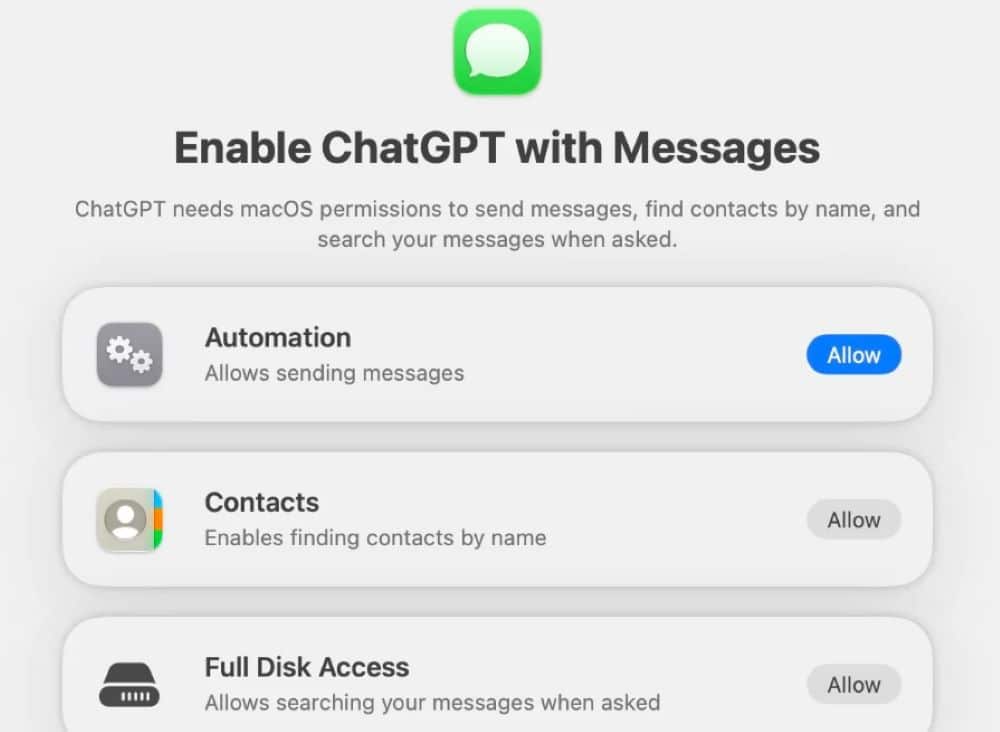
- OpenAI requires multiple manual permission approvals, including macOS Full Disk Access and Automation permissions.
- The plugin operates locally using native AppleScript and Accessibility services instead of a dedicated Apple API.
- Users must review and approve outgoing messages before ChatGPT sends them.
How the Plugin Operates on macOS
The new tool connects ChatGPT to the local database of Apple Messages on a computer. Once activated, users can ask the chatbot to scan their inbox for missed texts, locate specific contact details, draft quick responses, or extract calendar dates mentioned in conversations.
Rather than using an official public API provided by Apple, OpenAI designed the plugin using native macOS background utilities. It uses AppleScript and macOS Accessibility features to read on-screen text and control actions inside the Messages application. OpenAI stated that the feature runs locally on the computer and does not build a separate online index of a user’s full message archive.
Setup and Permission Requirements
Setting up the feature requires several manual configuration steps across the operating system. Users must first install the Apple Messages plugin from the official public plugin directory inside ChatGPT.
Following the initial setup prompt, the user must navigate to macOS System Settings and grant Full Disk Access to the ChatGPT application. The operating system also prompts the user to grant access to local contacts and allow automation control between ChatGPT and Apple Messages.
By default, ChatGPT prompts the user to review message text and recipient names before hitting send, preventing unauthorized outbound texts.
Availability and System Compatibility
The plugin works exclusively on Apple silicon Mac models running supported versions of macOS. It is active inside the ChatGPT desktop app for Codex and ChatGPT Work environments. The feature does not appear in standard consumer web browser chats, mobile apps, or older Intel-based Mac systems.
Frequently Asked Questions
Q1. Can ChatGPT send iMessages automatically without asking first?
A1. No. The tool includes a confirmation step by default that asks the user to check the text and the recipient before dispatching the message.
Q2. Does this plugin work on Windows or iPhone?
A2. No. The plugin is built specifically for the ChatGPT desktop app on Apple silicon Mac computers.
Q3. What permissions does ChatGPT require on Mac to use Messages?
A3. You must grant Full Disk Access, Contacts permission, and Automation access in macOS System Settings.
Q4. Which message formats can ChatGPT read on Mac?
A4. The tool works across iMessage, standard SMS text messages, and RCS conversations stored in the Messages desktop app.