Microsoft has started rolling out a rebuilt Windows Search for Windows 11 testers, shifting the tool from a basic indexing bar into an execution center. Announced on the Windows Insider Blog, the update rebuilds search on WinUI 3, a modern user interface framework for Windows software. Instead of merely displaying links to files, settings, and web queries, the new interface executes system tasks directly when you enter everyday commands. Testers in the Windows Insider Experimental channel can access the feature in Build 26340.9616.
Key Takeaways
- Direct Actions: Users can adjust system settings, manage open windows, and toggle hardware directly inside the search bar.
- New WinUI 3 Base: The interface uses less system memory and loads results faster.
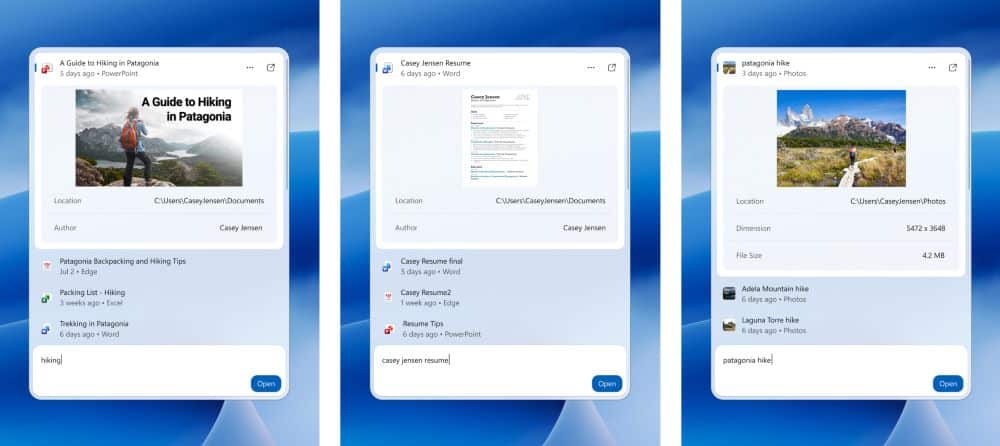
- Inline Previews: Files such as Word documents, PowerPoint presentations, and images show previews inside the search panel.
- Better Query Matching: The search bar now tolerates typos and recognizes natural language synonyms.
- Mobile Sync Ahead: Microsoft plans to introduce Phone Link quick controls to send text messages through search.
From Finding to Doing Inside Windows 11
Windows Search has long served as a directory to launch apps and find stored documents. With the latest build, the tool processes actionable commands in plain language. Typing phrases such as “switch to dark mode,” “turn on night light,” “dim my screen,” or “mute” triggers an immediate toggle switch right in the search flyout.
The utility also manages workspaces. Commands like “minimize all my windows” or “arrange windows on screen” organize open desktop software without requiring manual mouse clicks or keyboard shortcuts. Microsoft is also developing quick shortcuts for Phone Link, an application that connects Android and iOS phones to PCs, enabling users to send text messages directly from the search prompt.
Streamlined Design and System Efficiency
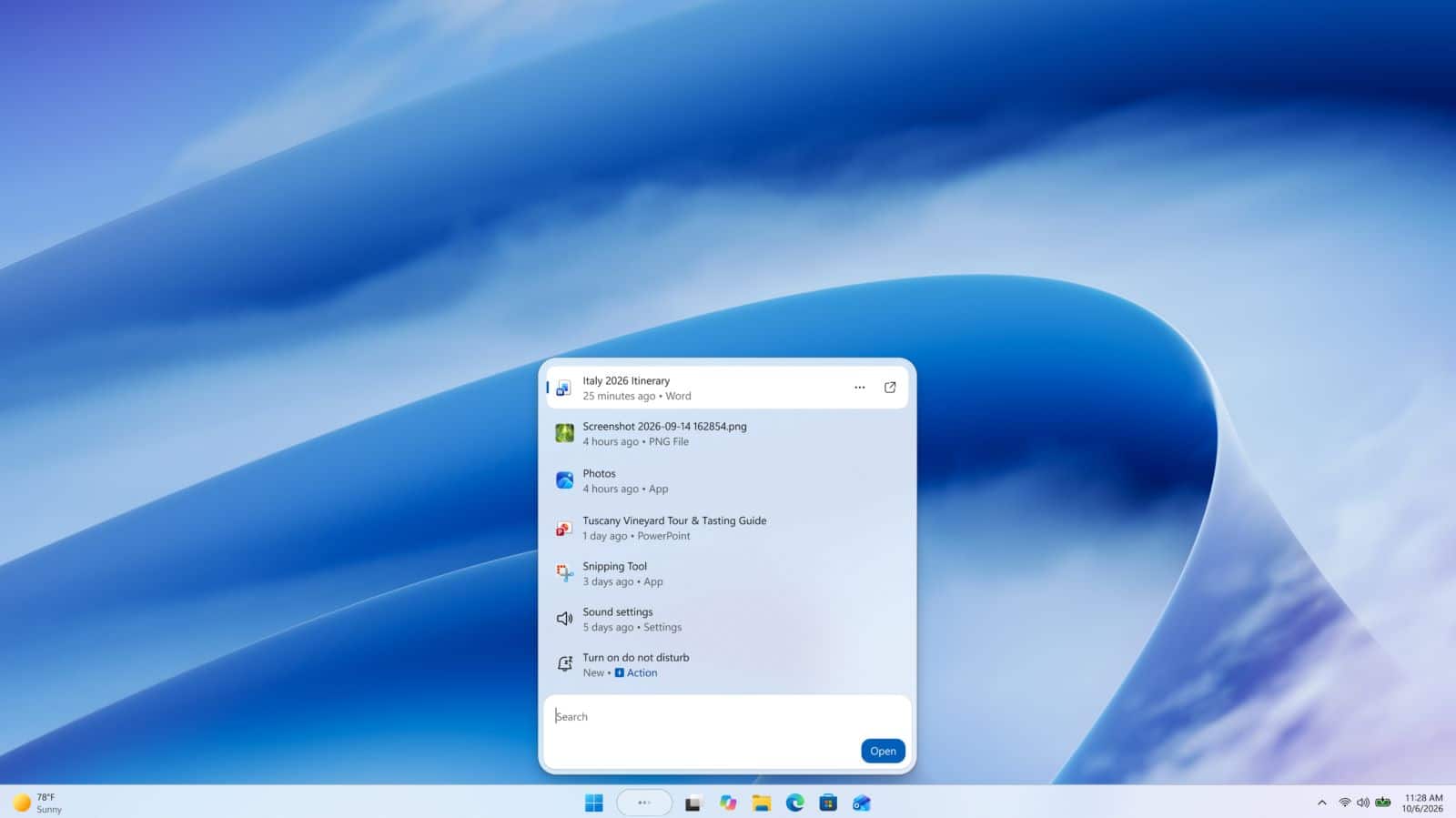
The redesign shifts from the old multi-tab interface to a single vertical column layout. The search bar sits near the base of the panel, with matching entries stacked above it. Results display clear category labels like “System settings,” “Photos,” or “Control panel” alongside the file modification date.
Building the search panel on WinUI 3 addresses longstanding community feedback regarding memory usage and interface lag. The underlying engine also features improved natural language parsing, allowing the search system to surface accurate local apps and system tools even when users mistype names or input colloquial synonyms.
For PC users in India and globally who rely on budget and mid-range laptops, lower memory consumption by core operating system tools directly frees up resources for heavy daily applications, office suites, and browser tabs.
Frequently Asked Questions
Q1. What is the new Windows Search inline action feature?
A1. Inline actions allow users to perform PC tasks such as changing brightness, switching to dark mode, muting audio, or snapping windows directly within the search bar without opening the Settings app.
Q2. Who can try the updated Windows Search right now?
A2. The feature is available to Windows Insiders enrolled in the Experimental Channel running Windows 11 Build 26340.9616. A device restart is required after upgrading to activate the feature flag.
Q3. What languages does the new Windows Search support at launch?
A3. Microsoft has launched the initial test build with support exclusively for English, with additional languages planned for future updates.
Q4. Will the new search panel consume more RAM?
A4. No, Microsoft rebuilt the search framework on WinUI 3, which is engineered to reduce system memory usage and deliver faster response times compared to previous versions