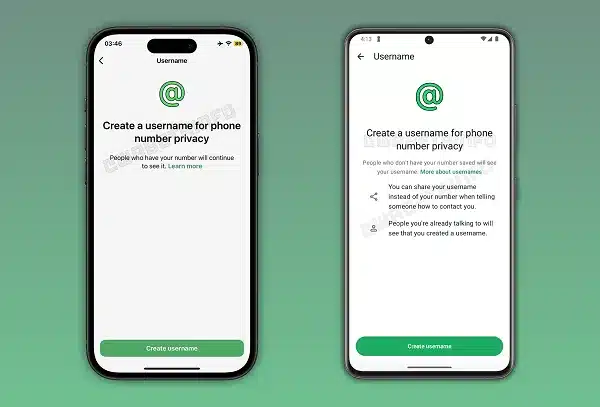
WhatsApp is introducing a feature that lets users set a unique username, allowing people to chat without sharing their mobile phone numbers. This change helps protect user privacy when interacting with new contacts or in large groups. While the feature is currently in a limited rollout phase, it represents a shift in how the Meta-owned platform manages user identities.
Key Takeaways:
- Users can create a unique username instead of showing their phone number.
- Usernames must be between 3 and 35 characters long.
- WhatsApp allows syncing names from Facebook or Instagram.
- A four-digit pin can be used to control who sends the first message.
WhatsApp, a popular messaging application in India, is altering its foundational structure. Historically, contacts on the app were accessible by phone numbers. Now, the company is allowing select users to utilize a username feature in their profile settings. To create a username, there are a series of stipulations. It may contain lowercase letters, numbers, and underscores, but must contain one letter. It also may not resemble a URL or end with a domain.
Because Meta owns WhatsApp, the service verifies names against Facebook and Instagram. Meta is the parent company of multiple social networking sites. If a person has claimed a name on one of those applications, it is then blocked on WhatsApp. Users have the option of keeping social media names consistent. If you prefer to keep your various social media accounts distinct, be careful and use a different name.
Privacy and Safety Improvements
This update is motivated by privacy concerns. Users typically participate in sizeable WhatsApp groups in which every participant has visibility of their phone number. Unlike mobile numbers, users’ usernames can be masked. There is also a pilot of a four-digit code feature on WhatsApp. This means that to message you for the first time, someone without your number must enter the code. This means users can’t discover your username to send you messages.
These changes have been noticed by WABetaInfo, which tracks the changes in different applications. Rollout of the changes is being done in phases. Some users will have the option in their settings today, while others have to wait longer. Users can go to their profile settings to check for a username field next to their name and photo. This changes the app to be more like other messaging applications, which provide more privacy around personal phone numbers.
This element aims to enhance the app’s security for users who prefer to keep their private contact information undisclosed to all. With the incorporation of usernames, the app enables users to connect for professional and social purposes without revealing their mobile numbers. As this update becomes available to more users, it will impact the way group and business chat functionalities operate in the region.
Frequently Asked Questions
Q1: Does this mean my phone number is gone?
A1: No. Your phone number is still used to set up your account and is visible to people who already have it saved in their contacts.
Q2: Can I change my WhatsApp username later?
A2: Yes. You should be able to edit your username through the profile settings menu, similar to how you change your profile picture or bio.
Q3: What is a username key?
A3: It is a four-digit PIN that strangers need to enter to start a chat with you if they are using your username to find you.
Q4: Can I use capital letters in my username?
A4: No. The current rules state that usernames can only contain lowercase letters, numbers, periods, and underscores.