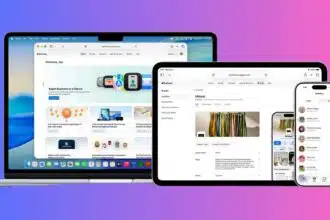
Spotify has rolled out a new feature called Mix, designed for Premium subscribers. The tool lets users create custom transitions and effects between songs in their playlists, almost like having a mini DJ setup right inside the app. It’s currently in beta, but the intention is clear: Spotify wants to give listeners more creative control, building on top of features like the AI DJ and personalized playlists. Once it’s switched on, the Mix button appears directly on existing playlists, letting users shape how their songs connect.
Key Takeaways
- ‘Mix’ is a new feature for Spotify Premium users to create custom audio transitions.
- It allows for hands-on control with tools for volume, EQ, and effects.
- Users can choose from presets like ‘Fade’ or ‘Rise’ for quick adjustments.
- The feature provides key musical data like BPM and Camelot key to help with mixing.
- It’s available in beta and can be toggled on or off at any time.
How the ‘Mix’ Feature Works
The Mix button appears in the toolbar of any playlist. Tapping it changes the layout and reveals a set of new options. There’s an Auto button for those who just want Spotify to handle transitions on its own, but the real appeal comes from the manual controls.
Users can pick from presets such as Fade or Rise to apply familiar styles quickly. For those who want to dive deeper, the feature shows a waveform visualization along with useful data like BPM (beats per minute) and the Camelot key. Having this information makes it easier to match songs that fit together and create smooth, professional-sounding blends.
Inside the customization panel, users can fine-tune volume curves, EQ, and effects at the transition points between tracks. This makes it possible to design a playlist that feels continuous, whether it’s a party mix that flows nonstop or a workout playlist that keeps the tempo steady. All edits are saved right to the playlist, but nothing is locked in. With a single tap of the Mix button, changes can be turned off at any time.
Comparing ‘Mix’ with Existing Features
Spotify already offers basic tools like crossfade and the AI DJ, but Mix sets itself apart. The AI DJ curates music and adds commentary, while Mix gives users direct control over how their playlists sound. And compared with the crossfade option, which only overlaps tracks, Mix goes much further with detailed customization of the transition itself.
There’s also a collaborative angle. Premium users can work together on a mixed playlist, experimenting with transitions as a group. To make things more personal, Spotify has added options for custom cover art, new stickers, and labels that mark playlists as mixes. It gives each playlist more of a signature look, encouraging users to share them with others.
So far, the response from listeners on forums and social media has been positive. Many people welcome the chance to move away from algorithm-driven listening, which some say feels repetitive. The idea of being able to craft playlists for specific situations, whether that’s a run, a party, or even just background music, has been met with enthusiasm. The feature is still in beta but is gradually rolling out to Premium users worldwide.
FAQs
Q1. Is the ‘Mix with Spotify’ feature available for free users?
A1. No, the ‘Mix’ feature is currently in beta and is only for Spotify Premium subscribers.
Q2. Can I use the ‘Mix’ feature on a playlist I made with a friend?
A2. Yes, you can use the ‘Mix’ feature on collaborative playlists if you and your friends are all Premium users.
Q3. Will ‘Mix’ be available in India?
A3. The feature is rolling out to eligible Premium users globally. Its availability in specific regions like India depends on the rollout schedule, so users should keep their app updated.
Q4. What is the difference between ‘Mix’ and the normal crossfade option?
A4. Crossfade is a simple overlap of two songs. ‘Mix’ is more detailed, allowing you to adjust volume, EQ, and apply specific effects like ‘Fade’ or ‘Rise’ at the transition point.
Q5. Does the new ‘Mix’ feature replace the AI DJ?
A5. No, ‘Mix’ is a separate feature. The AI DJ is an AI-curated listening experience with voice commentary, while ‘Mix’ is a hands-on tool for you to manually edit transitions in your own playlists.