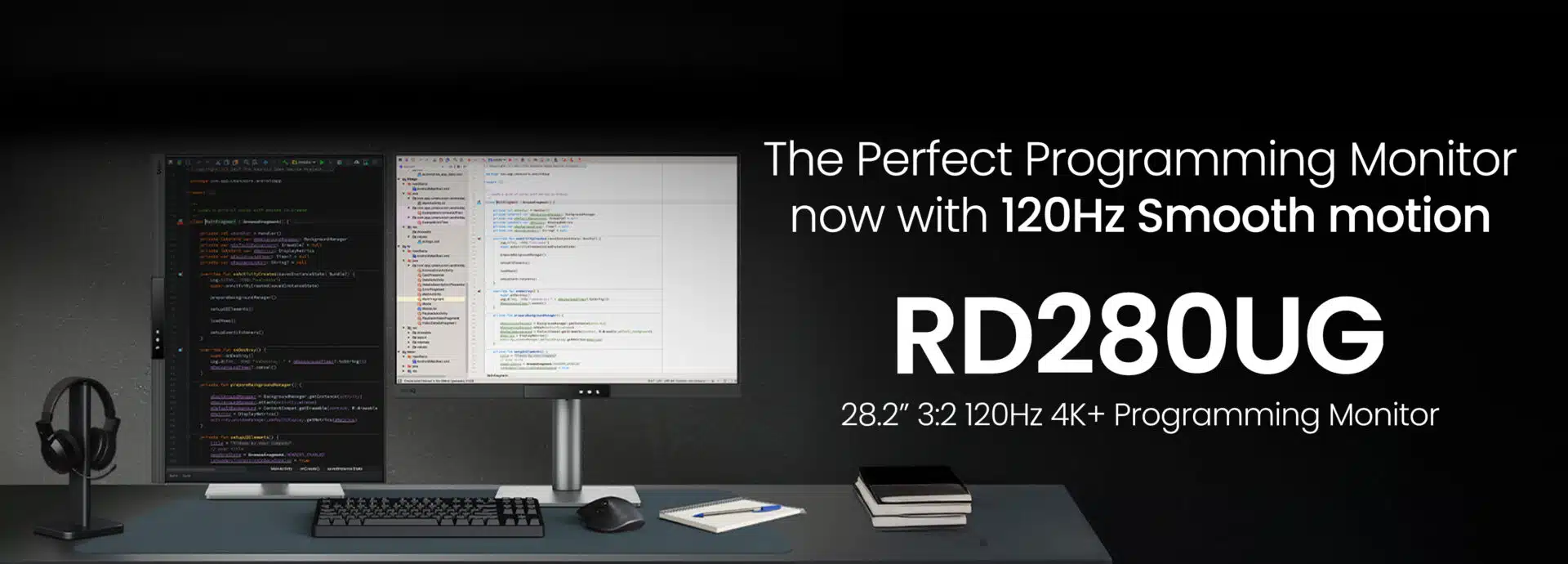
BenQ India today expanded its specialized programming monitor lineup with the launch of the RD280UG. This 28 inch flagship display specifically targets the growing community of software developers and IT professionals in India who require superior text clarity and visual comfort. By combining a rare 3:2 aspect ratio with a high 120Hz refresh rate, the monitor aims to reduce the physical and mental strain associated with long coding sessions. The RD280UG is designed to provide a more vertical workspace, allowing coders to view more lines of code simultaneously compared to traditional widescreen displays.
Key Takeaways
- Optimized Workspace: Features a 28.2 inch 4K+ (3840 x 2560) panel with a 3:2 aspect ratio for increased vertical space.
- Fluid Performance: Equipped with a 120Hz refresh rate for smooth scrolling through thousands of lines of code.
- Superior Contrast: Boasts a 2000:1 static contrast ratio to make text pop against dark or light IDE themes.
- Eye Protection: Includes MoonHalo bias lighting and Night Hours Protection with 2 nits ultra-low brightness for late-night work.
- Smart Connectivity: Offers a 90W USB-C port for single-cable charging, data, and display, along with a built-in KVM switch.
- Price and Availability: Available across India at a best price of ₹64,990.
Enhanced Clarity for Deep Focus
The RD280UG introduces several hardware and software features designed to keep developers in a state of flow. The Nano Matte Panel uses a specialized low-reflection coating to eliminate glare from office lights or windows. This is paired with Coding Mode 2.0, which includes dedicated settings for both dark and light themes. These modes adjust contrast and sharpness to ensure that syntax highlighting remains distinct, helping programmers spot bugs or logic errors more quickly.
The monitor also includes a new Paper Color Mode. This setting mimics the appearance of printed paper by softening the backlight and adjusting the color temperature. It is specifically designed to provide relief for eyes that have become fatigued after hours of staring at high-brightness digital displays.
Professional Ergonomics and Eye Care
Understanding that software development often involves long hours, BenQ has integrated a comprehensive ergonomic stand. The RD280UG supports height adjustment up to 150mm, along with tilt, swivel, and a 90° pivot for vertical coding. The Auto Pivot feature automatically adjusts the on-screen display (OSD) when the monitor is rotated, ensuring a smooth transition between landscape and portrait orientations.
For those working in low-light environments, the MoonHalo backlight on the rear of the monitor provides balanced ambient illumination. This reduces the harsh contrast between the bright screen and a dark room, which is a common cause of eye strain. The Visual Optimizer further assists by automatically adjusting screen brightness and color temperature based on the surrounding environment, similar to how modern smartphones operate.
Seamless Integration with Developer Tools
The RD280UG is fully compatible with Display Pilot 2 software, which works across macOS, Windows, and Linux. This software allows developers to control monitor settings directly from their keyboard or through a dedicated Coding Hotkey located on the front bezel. The built-in KVM (Keyboard, Video, Mouse) switch allows users to control two different computers, such as a laptop and a desktop, using a single set of peripherals.
Frequently Asked Questions
Q1: What is the benefit of a 3:2 aspect ratio for coding?
A1: A 3:2 ratio provides more vertical height than a standard 16:9 widescreen. This allows you to see more lines of code without scrolling, which helps in maintaining context while reading complex functions or long files.
Q2: Does the BenQ RD280UG work with MacBooks?
A2: Yes, it is fully compatible with macOS. It features a 90W USB-C port that can charge your MacBook while receiving a video signal through a single cable. It also supports daisy-chaining for multi-monitor setups.
Q3: What is MoonHalo lighting?
A3: MoonHalo is an integrated bias light on the back of the monitor. It projects a soft glow on the wall behind the screen to reduce eye strain caused by the high contrast between the monitor and its surroundings in dark rooms.
Q4: Can I use this monitor for gaming?
A4: While designed for programming, the 120Hz refresh rate and 4K+ resolution make it suitable for casual gaming. However, it lacks some specific gaming features like extremely low response times found in dedicated gaming monitors.