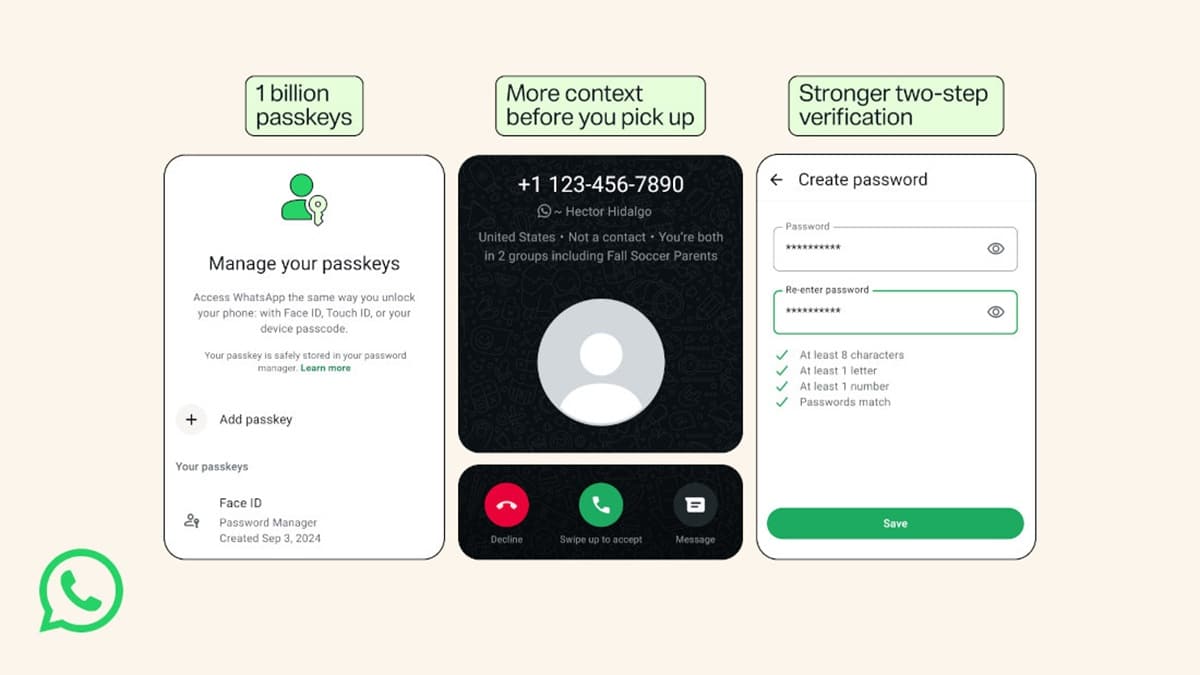
WhatsApp is rolling out major updates to account security, replacing its traditional six-digit two-step verification PIN with complex alphanumeric passwords and allowing users to register multiple passkeys across different devices. The instant messaging service, owned by Meta Platforms, announced the changes to curb SIM-swap frauds, phishing attempts, and unauthorized account hijackings. Alongside these login protections, WhatsApp is also introducing an incoming call screen feature on Android that flags numbers outside a user’s address book with country origins and shared group details.
Key Takeaways
- Multiple Passkeys: Users can now set up and store separate biometric passkeys on Android and iOS devices linked to the same account.
- Longer Passwords: Two-step verification now supports alphanumeric passwords with special characters, ending the limit of six-digit numeric PINs.
- Scam Call Screening: Android devices will display background context for unknown incoming callers, showing the registered country and common mutual groups.
- Adoption Milestone: Meta confirmed that more than one billion users have enabled passkey authentication since its debut.
Stronger Two-Step Verification
For years, WhatsApp required users who turned on two-step verification to set up a six-digit numerical code. While helpful against casual snooping, a six-digit code has only one million combinations, leaving it open to brute-force attempts and common guesses like birthdates or repetitive numbers.
The updated system lets users create full passwords containing uppercase and lowercase letters, numbers, and symbols. This password acts as a secondary checkpoint whenever an account is registered on a fresh device, ensuring a stolen one-time SMS code is not enough for an attacker to break into personal chats.
Multi-Device Passkey Support
Passkeys replace typed credentials with biometric confirmation, such as fingerprint scans, Face ID, or local device screen locks. Until now, WhatsApp restricted passkey storage to a single primary phone.
The update allows people who carry both an iPhone and an Android phone to maintain active passkeys on both platforms. Stored securely in Google Password Manager or Apple Keychain, these passkeys eliminate the wait for SMS verification codes during logins and protect users from credential-intercepting malware. Users can configure this feature directly inside the app by going to Settings, selecting Account, and tapping Passkeys.
Caller Context Against Phone Fraud
In India and other major markets where spam and impersonation calls remain frequent, WhatsApp is adding direct context on the incoming call screen for Android users. When an unsaved number rings, the screen now reveals whether the caller has an international country code and lists any mutual chat groups. This gives people immediate context to decline suspicious rings before any conversation begins.
Frequently Asked Questions
Q1. What is new in WhatsApp two-step verification?
A1. WhatsApp has replaced the old six-digit numeric PIN with full alphanumeric passwords that support letters, numbers, and special characters.
Q2. Can I use passkeys on both iPhone and Android for the same account?
A2. Yes. The new update allows you to save independent passkeys on Android and iOS devices tied to your account.
Q3. How do I enable a passkey on WhatsApp?
A3. Open WhatsApp, go to Settings, choose Account, select Passkeys, and follow the on-screen biometric setup.
Q4. Will my current six-digit PIN stop working immediately?
A4. No, existing PINs remain functional, but WhatsApp recommends upgrading to a full alphanumeric password in Account Settings for improved account defense.
Q5. How does the new incoming call screen assist against scams?
A5. For calls from unsaved contacts on Android, WhatsApp displays the caller’s country code and mutual groups so you can identify suspicious calls right away.