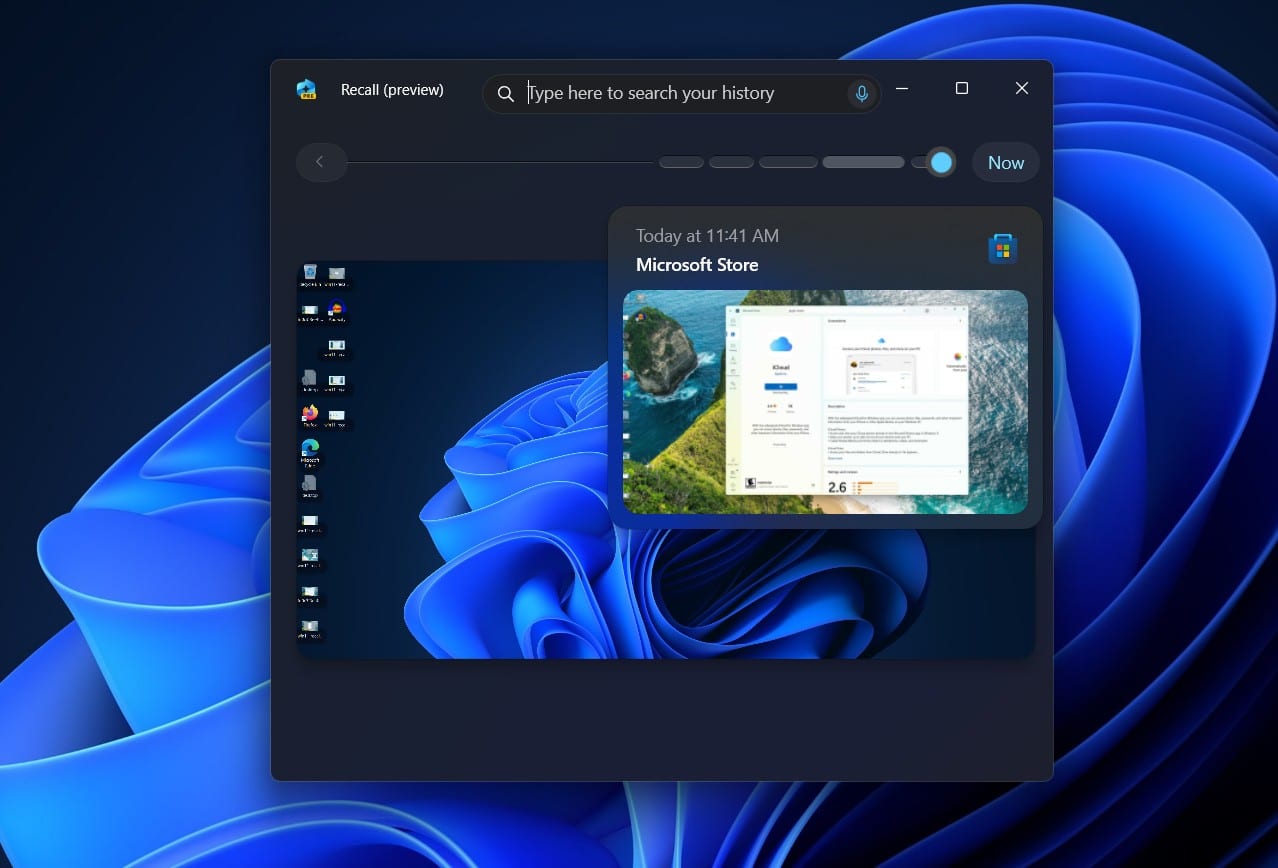
Windows 11 Recall, Microsoft’s ambitious feature aiming to give your PC a photographic memory, sparked intense debate the moment it appeared. Designed to capture snapshots of your screen activity every few seconds, allowing users to scroll back in time and find anything they’ve previously seen, it sounded like a powerful productivity tool. Imagine searching for that obscure detail from a website you visited last week using just a vague memory, or finding that document you were working on days ago without remembering where you saved it. That’s the promise of Recall.
But the reality of its initial announcement was far from this utopian vision. Instead, it triggered immediate and widespread alarm among privacy advocates and security experts. Concerns weren’t just theoretical; they were pointed, specific, and deeply worrying. The core fear: creating a treasure trove of sensitive personal data, from banking details and passwords to private conversations and confidential work documents, all stored locally but potentially vulnerable.
The Alarm Bells Ring Loud and Clear
The initial implementation, revealed in May 2024, was set to be enabled by default on new Copilot+ PCs. This “opt-out” approach was a major red flag. Critics argued that most users wouldn’t understand the feature’s implications or bother to turn it off, leaving a detailed history of their digital lives exposed.
Then came the security demonstrations. Researchers quickly showed that the data Recall collected was stored in an easily accessible database. This wasn’t just a theoretical risk; it meant that if malware infiltrated a system, or someone gained unauthorized physical access, they could potentially scoop up months of a user’s on-screen activity in one go. This felt less like a helpful memory aid and more like a built-in surveillance tool waiting to be exploited. Security expert Kevin Beaumont famously described it as akin to a “keylogger.” The backlash was swift and severe. The internet filled with guides on how to disable or even remove the feature, and the trust in Microsoft’s approach to user privacy took a significant hit.
Microsoft Responds: Acknowledging the Feedback
Facing this torrent of criticism, Microsoft pressed pause. They announced a significant change in strategy before Recall even saw a wide release. In June 2024, Microsoft confirmed that Recall would no longer be enabled by default. Users would have to actively choose to turn it on during the Copilot+ PC setup process – a crucial shift from opt-out to opt-in.
Beyond the opt-in change, Microsoft also detailed several security enhancements. A major step involved strengthening the encryption of the data Recall collects. Initially, while the drive might have been encrypted with BitLocker, the Recall database itself was found to be less protected once the user was logged in. Microsoft pledged to add “just in time” decryption protected by Windows Hello Enhanced Sign-in Security (ESS). This means the snapshots and the search index database remain encrypted until the user authenticates using Windows Hello (facial recognition, fingerprint, or a secure PIN), adding a vital layer of protection against unauthorized access even if the system is compromised while the user is logged in.
Microsoft also stated that sensitive information filtering would be enabled by default, aiming to prevent passwords, financial information, and national ID numbers from being captured. Users gained more granular control, with the ability to filter specific apps and websites from being included in snapshots and the option to delete individual snapshots or clear the entire history. They emphasized that all data stayed local on the device and was not sent to Microsoft or stored in the cloud.
What’s Been Fixed? A Step in the Right Direction
The shift to opt-in is arguably the most significant fix. It puts the decision-making power squarely in the user’s hands. No longer is this a feature silently accumulating data unless a user actively disables it. This addresses a core privacy concern raised initially.
The enhanced encryption, tied to Windows Hello ESS, provides a stronger defense against malware and unauthorized local access. The data is not just sitting there, potentially exposed once the user is logged in. Requiring re-authentication via Windows Hello to access Recall adds a necessary hurdle for potential attackers.
Giving users more control over what gets captured and the ability to delete data are also positive steps. This acknowledges that users might have legitimate reasons to exclude certain activities or remove specific information from their Recall history.
Microsoft’s clear communication that data remains local and is not sent to the cloud, repeatedly emphasized in their official statements, also helps to alleviate a major point of anxiety for users worried about their data being stored remotely.
Lingering Questions and Unresolved Issues
Despite these crucial fixes, some concerns persist. While encryption and Windows Hello authentication make accessing the Recall database harder, they aren’t foolproof. Sophisticated malware specifically designed to target Recall could potentially still pose a threat, perhaps by waiting for a user to authenticate and then quickly exfiltrating the data. Security is a constantly evolving landscape, and while Microsoft has improved the defenses, the sheer volume and sensitivity of the data Recall collects still make it a potentially high-value target.
The effectiveness of the sensitive information filtering is another area that requires continued scrutiny. Can it truly identify and exclude all sensitive data types in every context? What about information that isn’t a standard password format but is equally sensitive? Users should remain cautious and not assume Recall will automatically filter out everything they wouldn’t want captured.
There’s also the question of user understanding. While it’s now opt-in, the setup process still needs to be crystal clear about what Recall does, how it stores data, and the potential risks involved. Will the average user fully grasp the implications of enabling this feature, even with a clearer prompt?
Finally, Recall is only available on Copilot+ PCs, which have specific hardware requirements, including a Neural Processing Unit (NPU). This limits its availability and means users on older or less capable hardware won’t have access to the feature, regardless of whether they might find it useful.
The User’s Choice Remains Paramount
Windows 11 Recall has come a long way from its controversial unveiling. Microsoft heard the feedback, acknowledged the serious concerns, and implemented significant changes, particularly making it opt-in and enhancing security measures. The feature is now in the Release Preview channel for Windows Insiders, a sign that Microsoft is nearing a wider rollout for eligible devices.
For users with Copilot+ PCs, the decision to enable Recall is a personal one. Microsoft has put the control in your hands and added layers of security. However, the fundamental nature of the feature – continuously capturing your screen activity – means it holds a wealth of potentially sensitive information.
Before you decide to turn it on, consider the potential risks versus the potential rewards. Do the productivity benefits outweigh the possibility, however small, of that data being compromised? Are you comfortable with your PC maintaining such a detailed record of your activities?
Microsoft has fixed critical flaws in Recall’s initial design, but the inherent sensitivity of the data it handles means vigilance remains essential. Understanding what the feature does, how it’s secured, and the choices you have is the best way to navigate the complex landscape of AI-powered features and personal privacy in the age of Windows 11.