

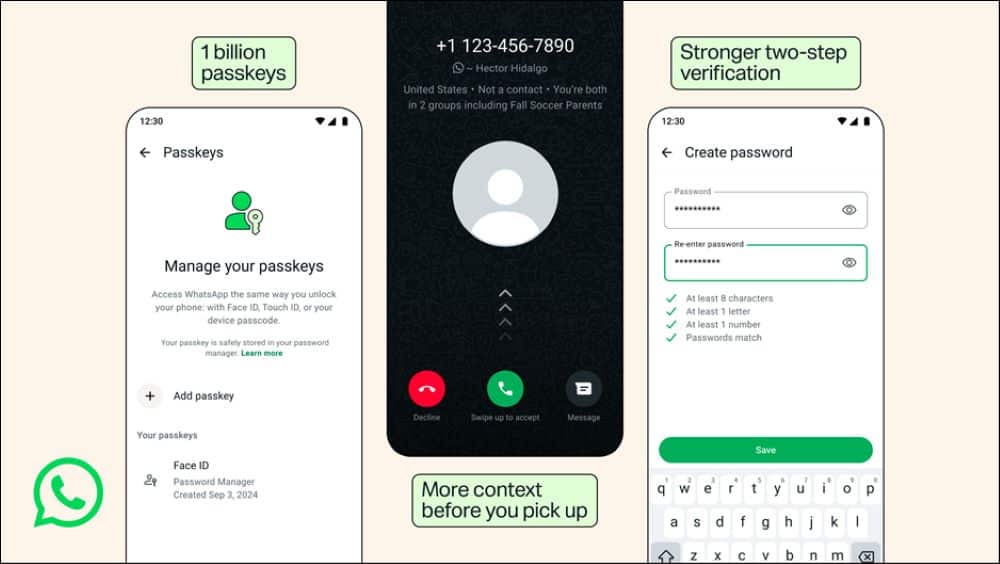
WhatsApp is rolling out three major account safety updates to protect its users against account takeovers and scam calls. The Meta-owned messaging platform announced that more than 1 billion people now use passkeys, prompting the company to expand the feature across multiple devices. The platform is also upgrading its traditional numeric two-step verification PIN to support full alphanumeric passwords and adding caller context screens for unknown incoming calls on Android devices.
Key Takeaways
- More than 1 billion users have adopted passkeys to log in using biometrics or screen locks.
- Users can now register multiple passkeys across both Android and iOS devices.
- Two-step verification now supports long, alphanumeric passwords with special characters instead of just a six-digit PIN.
- Android users will now see contextual details, like common groups and country codes, for calls from unsaved numbers.
Upgraded Passkeys and Alphanumeric Passwords
The passkey system allows WhatsApp users to log back into their accounts using their fingerprint, Face ID, or local device screen lock without waiting for SMS verification codes. Following adoption by over a billion accounts, WhatsApp now lets individuals add and manage multiple passkeys. This change helps users who switch between Android and iPhone hardware, as they can store distinct hardware credentials for the same account under Settings > Account > Passkeys.
For users relying on two-step verification (2FA), WhatsApp is moving away from the basic six-digit numeric PIN format. Account holders can now create complex alphanumeric passwords containing numbers, letters, and special symbols. This update targets brute-force attempts and common weak PIN choices, preventing unauthorized access even if an attacker intercepts an SMS one-time passcode.
Spam Call Context on Android
To address the rise in international spam calls and digital fraud, WhatsApp is adding background information cards for unknown incoming calls on Android. When a number not saved in your address book rings your phone, the screen displays key context before you pick up. This data includes the caller country origin and any mutual WhatsApp groups you share with that number.
Scammers often rely on quick reactions to trick users into answering. The added caller context allows users in India and worldwide to evaluate the legitimacy of an incoming call before picking up or declining the contact entirely.
Frequently Asked Questions
Q1. How do I enable a passkey on WhatsApp?
A1. Open WhatsApp, tap on Settings, select Account, and choose Passkeys. Follow the on-screen prompts to register your fingerprint, Face ID, or screen lock.
Q2. Can I use the same passkey on both Android and iPhone?
A2. Passkeys are tied to your device operating system keychain, but WhatsApp now allows you to register separate passkeys for each phone you use under the same account settings.
Q3. What changes in the new WhatsApp two-step verification?
A3. WhatsApp now supports full alphanumeric passwords with letters, numbers, and special symbols, replacing the older requirement of a simple six-digit numeric PIN.
Q4. Will WhatsApp show caller context for saved contacts?
A4. No, the context screen only appears for unsaved phone numbers to show country codes and shared group memberships.
Q5. Is the new caller context feature available on iPhone?
A5. WhatsApp has rolled out the caller context feature initially for Android users.