Google brings hands-free voice dictation tools directly into Gmail, Docs, and Google Keep, allowing users to type, edit, and format text using speech commands. The update targets people who handle heavy writing work on smartphones and laptops, cutting down the time spent manually typing on small keyboards. The rollout activates built-in microphone controls across both mobile apps and desktop browsers, giving users a simple way to speak their thoughts and convert them into clear text instantly.
Key Takeaways
- Google adds speech dictation tools across Gmail, Docs, and Keep for faster text entry.
- The feature includes voice commands for punctuation, line breaks, and simple text edits.
- Users can switch between typing and talking without restarting the audio session.
- Android, iOS, and desktop web versions receive the update globally in phases.
How Voice Controls Work Across Google Apps
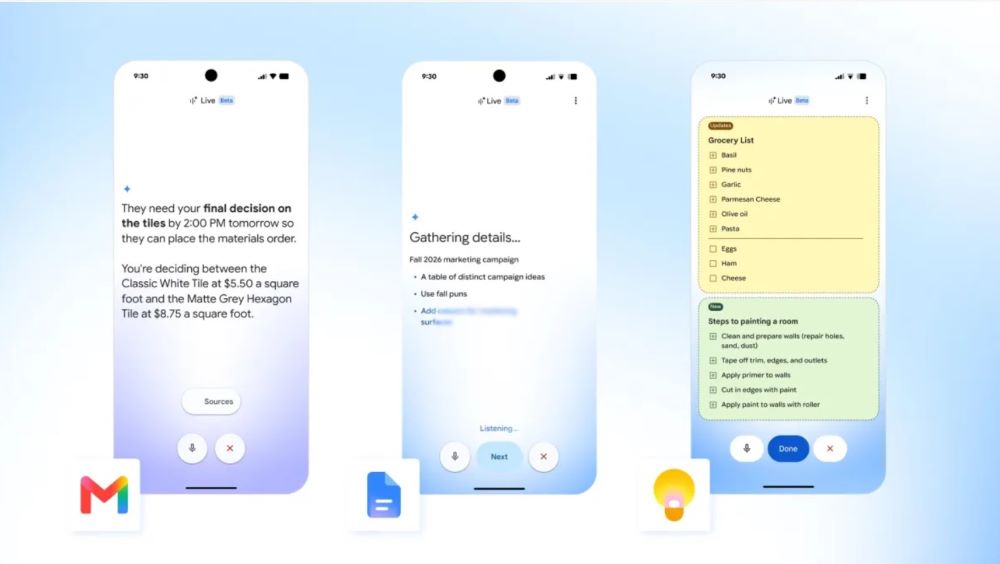
Typing long drafts on touchscreens often slows down daily communication. The new voice controls place an active microphone icon inside the text field of each app. When you tap the microphone in Gmail, you can dictate complete message bodies, add recipient names, and command the app to add commas or start fresh paragraphs. The system detects natural pauses, reducing the common run-on sentences that older voice recognition tools often generated.
In Google Docs, the speech tool handles longer documents without stopping automatically after short intervals. Writers can speak continuously, insert bulleted lists, and highlight specific words using voice instructions. If the speech engine mishears a technical term or a regional name, you can correct the text by hand right away using your physical keyboard or keypad without closing the microphone tool. This smooth flow helps professionals in India who mix spoken notes with manual revisions during work hours.
Google Keep receives an upgrade that separates quick audio memos from direct text dictation. Previously, Keep users recorded voice clips that the app saved as separate audio files alongside small snippets. Now, speaking into Keep types words directly onto the active note screen in real time. This change helps users build quick grocery lists, capture project reminders, or draft quick messages on the go.
System Compatibility and Regional Rollout
The tool runs through Google cloud speech models to parse different regional English accents and common vocabulary. Users in India do not need separate third-party transcription software or browser extensions to use the voice feature. The system runs on regular cellular internet speeds and Wi-Fi networks without noticeable lag during speech capture.
Google has started pushing the feature through standard app updates on the Google Play Store, the Apple App Store, and modern web browsers including Chrome and Edge. Workspace business users and personal Google account holders receive access automatically without extra fees.
Frequently Asked Questions
Q1. How do I turn on voice dictation in Gmail?
A1. Open a new email compose window in the Gmail app or web browser and click the microphone icon located near the text toolbar. Grant microphone permissions if prompted, then start speaking.
Q2. Does voice dictation support Indian English accents?
A2. Yes. The voice tool recognizes Indian English accents along with everyday business terminology without needing special training.
Q3. Can I speak punctuation marks while dictating?
A3. Yes. Saying words like “comma,” “period,” or “new line” inserts the proper punctuation mark directly into the text draft.
Q4. Is an active internet connection required for voice typing?
A4. Yes. The feature requires an active network connection to process speech data accurately through Google servers.
Q5. Does this feature cost extra money for regular Gmail users?
A5. No. The voice typing tools are free additions for all personal Google accounts and Workspace customers.