
Adobe rolls out full public access to its AI audio tools within the Adobe Firefly creative studio, allowing creators to produce original background tracks, voiceovers, and sound effects from text prompts. The suite includes three key additions: Generate Music, Generate Speech, and Generate Sound Effects. Alongside the audio release, Adobe is adding Google’s Gemini Omni Flash model to its studio library and introducing a free daily tier for Firefly AI Assistant.
Key Takeaways
- Adobe Firefly opens Generate Music, Generate Speech, and Generate Sound Effects to all users.
- Generated audio tracks carry universal commercial licensing to avoid copyright strikes and takedowns.
- The Generate Speech tool provides access to ElevenLabs alongside Adobe’s native speech model.
- Adobe incorporates Gemini Omni Flash, supporting text, video, audio, and image inputs.
- Firefly AI Assistant receives a free tier offering daily generation credits.
Audio Generation Capabilities
Software giant Adobe has built the new features to address licensing friction and workflow switching. A Berklee College of Music survey revealed that 80 percent of video creators post content several times a week, and all respondents use music in their work.
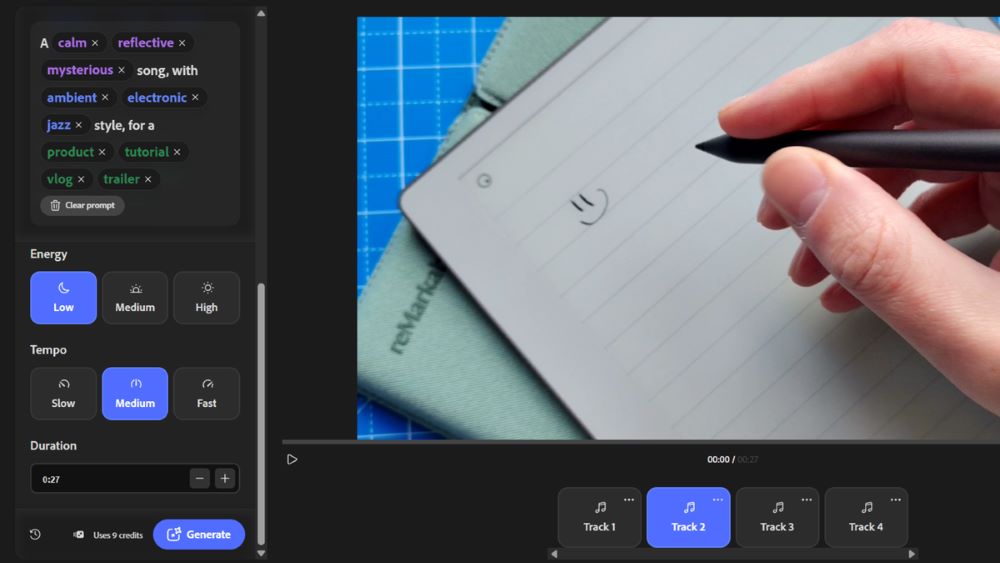
Generate Music produces original tracks matched to video length and specific moods. Because the system generates tracks designed for commercial use, creators avoid copyright claims across platforms like YouTube and Instagram.
Generate Speech converts written text into natural voice tracks. Users can choose the Firefly Speech Model or tap into ElevenLabs to control tone, voice style, and pacing. Generate Sound Effects matches actions and timing for video scenes and tutorials.
Multi Model Hub and Assistant Features
Adobe Firefly functions as a central creative hub. It hosts native tools alongside external systems from OpenAI, Runway, Kling AI, and Luma AI. The addition of Google Gemini Omni Flash allows creators to build storyboards and drafts by feeding audio, video, and images directly into prompts.
Adobe is also expanding Firefly AI Assistant. The tool supports skills like Create Storyboard, Create Brand Kit, and batch image editing. Users can now access these features through a free option that includes daily credits.
Frequently Asked Questions
Q1. What is Adobe Firefly?
A1. Adobe Firefly is a generative AI system from Adobe that creates images, videos, audio, and design assets from user prompts.
Q2. Are tracks from Firefly Generate Music safe for commercial projects?
A2. Yes, all tracks created with the tool carry universal commercial licensing for client work, social media, and advertising.
Q3. Can I use ElevenLabs voices directly inside Adobe Firefly?
A3. Yes, the Generate Speech tool lets users select ElevenLabs alongside Adobe’s native speech model.
Q4. Is there a free way to test Firefly AI Assistant?
A4. Yes, Adobe offers a free tier that provides daily generations for users to test features like Create Storyboard and Create Brand Kit.
Q5. Which inputs does the Gemini Omni Flash model support in Firefly?
A5. Gemini Omni Flash accepts text, image, video, and audio inputs within Firefly to help build project drafts.