Microsoft is pushing the boundaries of artificial intelligence integration within its flagship operating system. In a move that promises to reshape how users interact with their PCs, the tech giant has begun rolling out groundbreaking new capabilities for Copilot on Windows to its Windows Insider program members. The latest update introduces highly anticipated “vision” and enhanced file search functionalities, signaling a significant step forward in Microsoft’s vision for AI-powered assistance.
This development, confirmed through official Microsoft communication channels and observed by keen-eyed Windows enthusiasts, marks a pivotal moment in the evolution of Copilot. Initially launched with text-based interaction, the AI assistant is now gaining the ability to “see” what’s displayed on a user’s screen and perform more intelligent and context-aware file searches. This expansion aims to make Copilot an even more integral and intuitive part of the Windows experience, moving beyond simple commands to offer proactive and insightful support.
Seeing is Believing: Copilot Gains Visual Intelligence
The introduction of vision capabilities to Copilot on Windows opens up a wealth of possibilities for users. Imagine being able to ask Copilot to summarize the contents of an image, identify objects within a photo, or even extract text from a screenshot directly within your workflow. This feature leverages advanced optical character recognition (OCR) and image analysis models to understand visual information presented on the screen.
For instance, a student could quickly grab a screenshot of a complex diagram from an online lecture and ask Copilot to explain the key concepts. A professional might use the feature to identify a specific product in an image shared by a colleague or to quickly pull out contact information embedded within a scanned document. The potential applications span across various scenarios, promising to boost productivity and streamline tasks that previously required separate tools or manual effort.
Microsoft has emphasized the user’s control over this feature. Users will likely have granular settings to manage when and how Copilot can access and analyze their screen content, addressing potential privacy concerns. This approach aligns with Microsoft’s commitment to responsible AI development and user data protection.
Finding Files Gets Smarter: Contextual Search Comes to Copilot
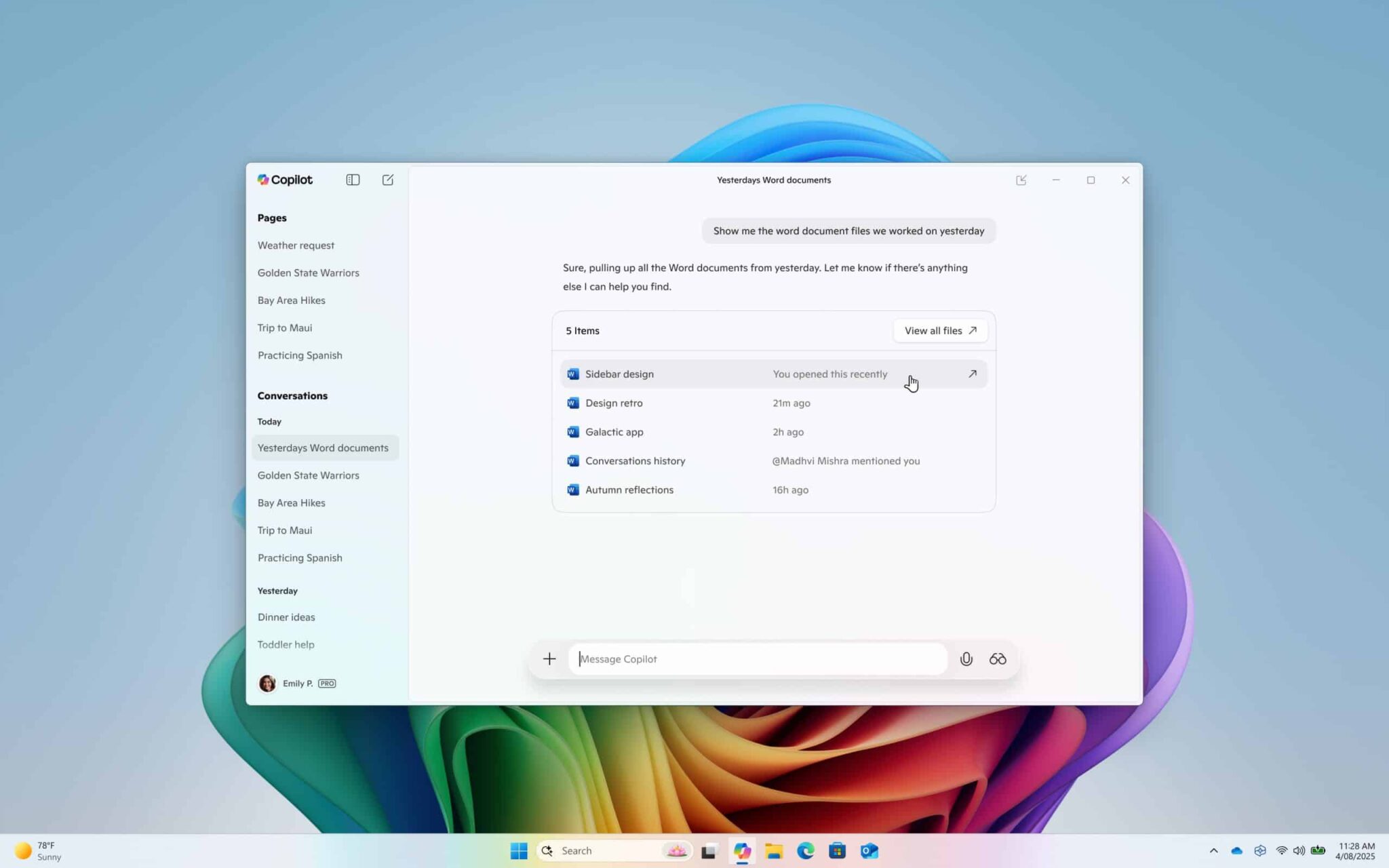
Alongside the vision capabilities, Microsoft is also rolling out an enhanced file search experience within Copilot. This upgrade goes beyond simple keyword matching, enabling users to find files based on more contextual and natural language queries.
Instead of just typing a file name, users might be able to ask Copilot to “find the presentation I worked on last week about the Q2 earnings” or “show me the documents related to the Smith project.” Copilot will leverage its understanding of language and context, potentially considering file content, metadata, and even recent activity to deliver more accurate and relevant search results.
This improvement addresses a common frustration point for many computer users – the often tedious and time-consuming process of locating specific files buried within their file system. By making file search more intuitive and intelligent, Copilot aims to save users valuable time and effort, allowing them to focus on more important tasks.
Windows Insiders Get First Look at the Future
As is customary with major Windows features, these new Copilot capabilities are initially being rolled out to users enrolled in the Windows Insider Program. This program allows Microsoft to gather valuable feedback from early adopters, identify potential issues, and refine the features before a wider public release.
The rollout is expected to occur in a phased manner, meaning that not all Windows Insiders will gain access to these features immediately. Microsoft typically monitors the initial feedback and performance before expanding the availability to a larger subset of Insiders.
What This Means for the Future of Windows
The introduction of vision and enhanced file search in Copilot signifies Microsoft’s ongoing commitment to integrating AI deeply into the Windows operating system. Copilot is envisioned as more than just a chatbot; it’s intended to be a proactive and intelligent assistant that helps users navigate their digital world more effectively.
By giving Copilot the ability to understand visual information and perform more intelligent file searches, Microsoft is making significant strides towards this vision. These new features have the potential to fundamentally change how users interact with their computers, making everyday tasks simpler, faster, and more intuitive.
User Reactions and Expectations
The announcement has already generated considerable buzz within the tech community and among Windows users. Many are expressing excitement about the potential productivity gains and the convenience these new features could offer.
However, some users are also raising questions about the accuracy and reliability of the AI, as well as potential privacy implications. Microsoft will need to address these concerns transparently and ensure that the implementation is robust and user-friendly.
How to Try It Out
For users eager to experience these new Copilot features, the first step is to enroll in the Windows Insider Program and ensure their device is on a Dev or Beta channel build where these features are being tested. Keep an eye out for announcements from Microsoft regarding the specific build numbers and availability of these features.
The rollout of vision and file search in Copilot is likely just the beginning. As AI technology continues to advance, we can expect even more sophisticated capabilities to be integrated into the Windows experience. Copilot has the potential to become an indispensable tool for Windows users, assisting with a wide range of tasks and making computing more accessible and efficient for everyone. This latest update is a clear indication that Microsoft is serious about making AI a core component of the future of Windows.