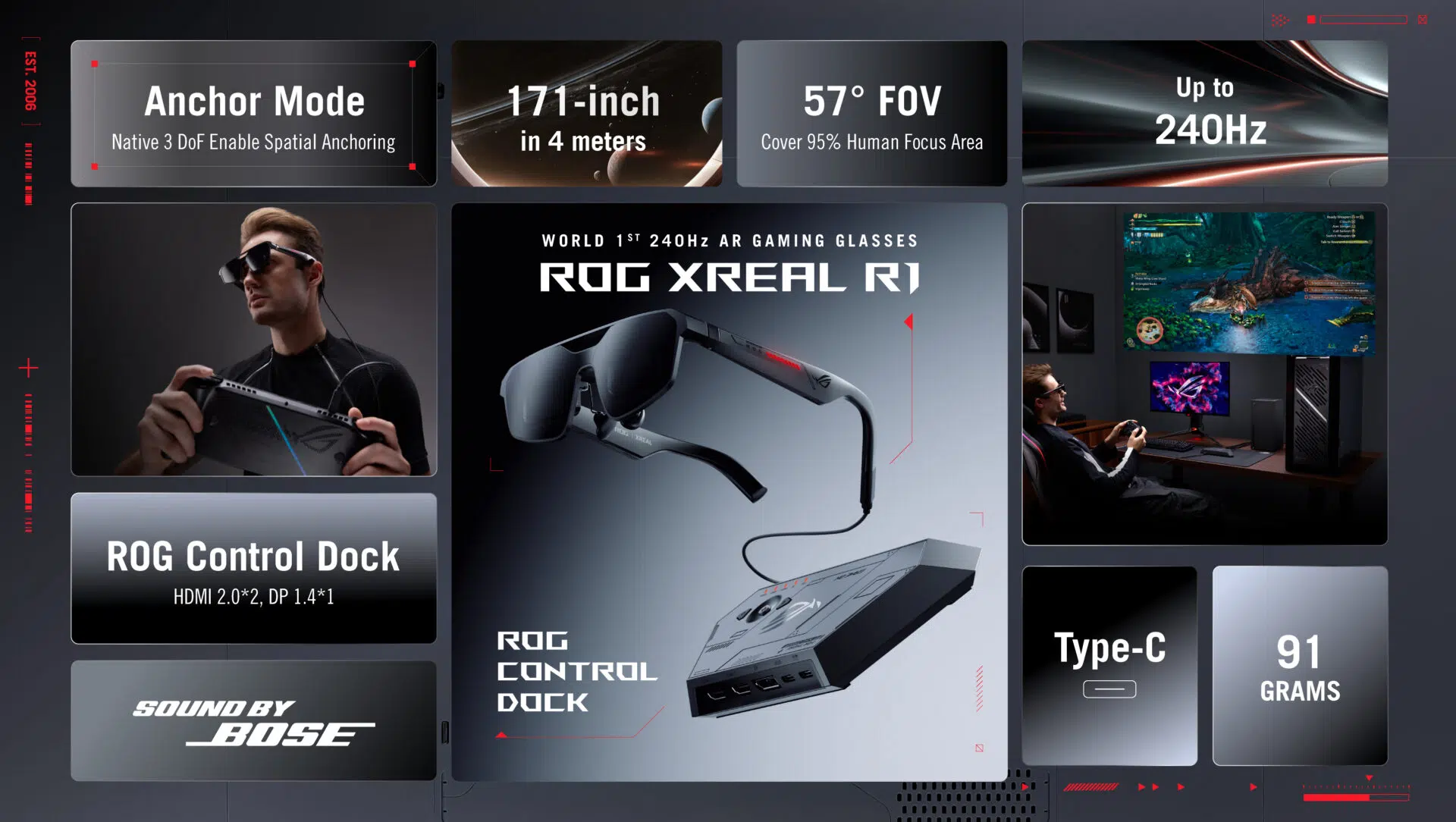
ASUS Republic of Gamers (ROG) has officially unveiled the ROG XREAL R1, a new pair of augmented reality gaming glasses that immediately stand out for one reason above all else. They run at a 240Hz refresh rate, something no other AR wearable has offered before. The announcement was made during CES 2026 in Las Vegas, and while CES always brings bold hardware claims, this one feels particularly deliberate.
The ROG XREAL R1 uses micro-OLED panels to deliver a Full HD resolution of 1920 x 1080 per eye. ASUS positions the glasses as a way to experience a massive virtual display without committing to a large physical monitor. In practice, the R1 is designed to work across multiple gaming platforms, including the ROG Ally handheld, desktop PCs, laptops, and modern consoles, with connectivity handled through a dedicated ROG Control Dock.
Key Takeaways
- High Refresh Rate: The ROG XREAL R1 is the first AR gaming headset to reach 240Hz, which should noticeably smooth out fast-paced gameplay.
- Massive Virtual Screen: ASUS claims the glasses project a 171-inch virtual display that appears roughly four meters away.
- Broad Compatibility: The bundled ROG Control Dock provides HDMI 2.0 and DisplayPort 1.4, allowing easy use with consoles and PCs.
- Lightweight Build: At just 91 grams, the glasses are designed for portability and extended sessions.
- Adaptive Optics: Electrochromic lenses automatically or manually adjust tint levels depending on ambient light.
Hardware and Display Quality
The ROG XREAL R1 relies on micro-OLED technology to achieve high contrast, deep blacks, and strong color accuracy. With a 57-degree field of view, the virtual display reportedly fills about 95 percent of the user’s focused vision. It ends up feeling less like a floating window and more like sitting in front of an oversized personal screen. I think that comparison makes sense, especially for players used to large TVs or ultrawide monitors.
The jump to 240Hz is a significant one. Most AR glasses before this have topped out at 120Hz, which is already respectable. Doubling that refresh rate should help reduce motion blur, particularly in competitive shooters, racing titles, or anything where rapid camera movement is constant. Of course, the benefit depends heavily on whether the connected device can actually push frame rates that high.
ASUS worked closely with XREAL, a company with a solid track record in consumer AR hardware. To handle the bandwidth and processing demands, the glasses include a built-in X1 spatial co-processing chip. This chip manages 3 Degrees of Freedom tracking, meaning the virtual screen stays anchored in space even when the wearer moves their head slightly. It is a subtle feature, but without it, the experience would feel far less stable.
Connectivity and Usage
For ROG Ally owners, the setup is intentionally simple. The glasses connect via a single USB-C cable, and no additional software is required. The Ally’s built-in screen remains active and functions as a touch interface, while the game itself appears on the virtual 171-inch display. It is a clean approach, and probably the most appealing use case ASUS has in mind.
When used with a PlayStation 5, Xbox, gaming laptop, or desktop PC, the included ROG Control Dock becomes essential. The dock acts as a central hub, letting users switch between HDMI and DisplayPort sources with a single button press. This makes moving between systems less of a hassle than it might sound at first.
Audio is handled through speakers integrated into the frame, developed in collaboration with Bose. ASUS emphasizes spatial audio, which helps with directional cues like footsteps or environmental effects. In brighter environments, the electrochromic lenses automatically darken to improve contrast. Users can also manually adjust the tint if they want to block out more of the surrounding room and focus entirely on the game.
Practical Design
Weighing just 91 grams, the ROG XREAL R1 is about as heavy as two pairs of standard sunglasses. That matters more than it might seem. Heavier headsets tend to become uncomfortable over long sessions, and AR glasses are often worn for hours at a time rather than minutes.
The R1 offers two display modes. Anchor mode keeps the virtual screen fixed in one position, similar to a wall-mounted TV. Follow mode allows the screen to move subtly with head motion, which can help reduce discomfort or motion sickness for some users. It is good that ASUS includes both options, since tolerance varies a lot from person to person.
Frequently Asked Questions
Q1: Can I use these glasses if I wear prescription spectacles?
A1: Yes. The ROG XREAL R1 generally supports prescription lens inserts that clip behind the AR lenses. These are usually ordered separately and customized to individual vision requirements.
Q2: Does the 240Hz refresh rate work on consoles?
A2: The glasses themselves support 240Hz, but current consoles like the PlayStation 5 and Xbox Series X typically cap output at 120Hz. The higher refresh rate is mainly useful for high-end PCs that can reach those frame rates.
Q3: Do the glasses have a battery?
A3: No internal battery is included. The glasses draw power directly from the connected device or from the ROG Control Dock, which helps keep the overall weight low.
Q4: What is the difference between AR glasses and VR headsets?
A4: Virtual reality headsets block out the real world entirely. These AR glasses remain transparent, allowing users to see their surroundings while a virtual display appears in front of them.
Q5: Is the ROG Control Dock included in the box?
A5: Yes. ASUS includes the ROG Control Dock with the ROG XREAL R1 to ensure compatibility with HDMI and DisplayPort devices, not just USB-C systems.