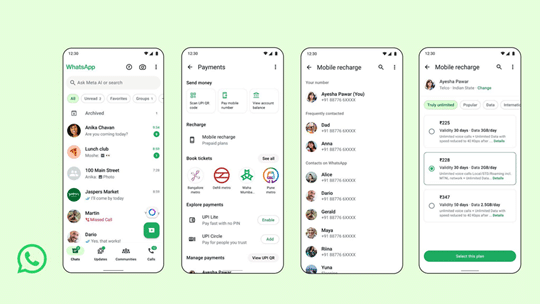
WhatsApp just made it easier for people in India to recharge prepaid mobiles. You don’t need to leave the app anymore. PayU handles the payments, so you can top up your own number or someone else’s. The feature is rolling out now for Android and iPhone. If you don’t see it yet, give it a week or two.
Key Takeaways:
- Users can recharge prepaid plans for Jio, Airtel, and Vi directly.
- A new rupee (₹) icon on the home screen gives fast access to payments.
- The feature supports UPI, debit cards, and credit cards.
- People can pay for their own numbers or for friends and family.
WhatsApp, owned by Meta (the same folks behind Facebook and Instagram), is already a go-to for chatting. PayU, on the other hand, handles online payments for a lot of businesses in India. Now they’ve teamed up so you can handle mobile recharges without bouncing between apps. Makes sense, right?
Before this, you had to jump to a bank or wallet app just to recharge your phone. Now you can do it right inside WhatsApp, even while chatting. No more switching apps just to top up. It’s a small thing, but it saves time.
The new rupee icon on your WhatsApp home screen does more than just recharges. You can use it to send money with UPI, book metro tickets in some cities, or pay bills. UPI, by the way, is India’s instant bank transfer system. If you haven’t tried it, it’s fast.
Ravi Garg from Meta India says people already use WhatsApp for all sorts of daily stuff. Adding recharges just means you can do even more in one spot. If you like keeping things simple, this is one less app to juggle.
Hemang Dattani at PayU points out that people want payment options where they already spend time. Mobile recharges are just another routine. Now you can get it done while messaging, no extra steps.
Steps to Recharge your Phone on WhatsApp
Want to try it? Open WhatsApp and look for the rupee symbol on the main screen. Tap it, pick mobile recharges, then choose a contact or type in a number. The app will ask you to pick the operator-Jio, Airtel, or Vi.
Next, browse the plans and pick what you need. Pay with UPI, debit, or credit card. Confirm, and you’re done. That’s it.
This isn’t the first extra feature for WhatsApp in India. You can already book metro tickets, chat with government bots, or pay utility bills. Now, with mobile recharges, WhatsApp is even more of a daily habit for millions.
Frequently Asked Questions
Q1: Which mobile operators work with this feature?
A1: Currently, the app supports prepaid recharges for Jio, Airtel, and Vi.
Q2: Where can I find the recharge option?
A2: Look for the rupee (₹) symbol on your home screen. Tapping this icon opens the payment and recharge section.
Q3: Can I pay for someone else’s phone?
A3: Yes, the feature lets you enter any prepaid number or select a contact to complete a recharge for them.
Q4: What payment methods can I use?
A4: You can pay using any UPI app linked to your bank account, or with your debit or credit cards.