
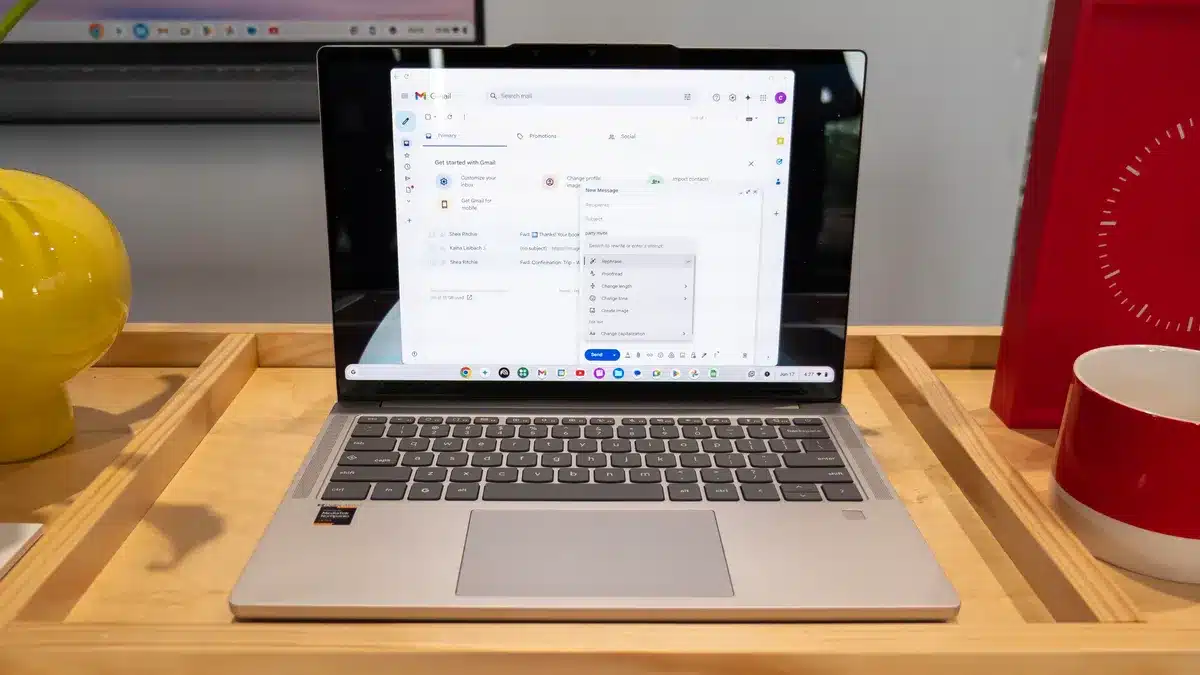
In a move set to redefine the landscape of budget-friendly computing, Google has just unveiled a sweeping update for its Chromebook Plus devices, integrating a powerful suite of artificial intelligence (AI) features. This ambitious push, revealed alongside the launch of the new Lenovo Chromebook Plus (14″, 10), signals a clear intent from the tech giant to elevate the ChromeOS experience, making it more intelligent, intuitive, and genuinely helpful for everyday users.
Key Takeaways
- AI-Powered Productivity: New features include “Select to search with Lens” for screen content analysis, “Simplify” for text comprehension, and Quick Insert for AI-generated images and text.
- Enhanced Creativity: AI image editing in the Gallery app allows for background removal and sticker creation, with the new Lenovo Chromebook Plus offering exclusive on-device capabilities.
- Intelligent Organization: “Smart grouping” automatically organizes tabs and documents, streamlining workflows for users juggling multiple tasks.
- Hybrid AI Approach: Chromebook Plus devices utilize both on-device Neural Processing Units (NPUs) and cloud-based AI for a balance of performance, privacy, and continuous updates.
- Premium Hardware Standards: Chromebook Plus maintains its stringent hardware requirements, including at least 8GB of RAM, 128GB of storage, and a Full HD IPS display, ensuring smooth AI performance.
- Free Google AI Pro: New Chromebook Plus users receive a one-year subscription to Google AI Pro, valued at $239.88, providing access to advanced Gemini features, Flow, Whisk, and more.
- Lenovo Chromebook Plus (14″, 10) Debuts: This new device, powered by the MediaTek Kompanio Ultra processor with 50 TOPS NPU, sets a new standard for AI-capable Chromebooks, offering up to 17 hours of battery life and an OLED display.
For years, Chromebooks have been lauded for their simplicity, security, and affordability. They offered a lean, cloud-centric experience perfect for Browse, email, and basic productivity. But the recent surge in AI advancements has prompted Google to rethink the very core of its ChromeOS, infusing it with intelligence that promises to transform how users interact with their devices. This isn’t just about adding a few clever tricks; it’s about making the Chromebook Plus a more capable, proactive partner in daily digital life.
The Brains Behind the Boost: On-Device and Cloud AI
The backbone of these new capabilities lies in Google’s hybrid approach to AI. Chromebook Plus devices now feature built-in Neural Processing Units (NPUs), specialized hardware designed to accelerate AI workloads directly on the device. This “on-device AI” offers several critical advantages: faster performance, enhanced privacy (as data doesn’t always need to leave the device), and the ability to function even when offline. Complementing this local processing power are cloud-based AI capabilities, which benefit from Google’s vast computing resources and continuous model updates, ensuring users always have access to the latest and most sophisticated AI tools. This blend of local and cloud processing aims to deliver an optimal balance of speed, security, and up-to-date functionality.
New AI Features: A Closer Look
Google’s latest update introduces a suite of AI tools designed to make Chromebook Plus devices more intuitive and powerful.
Smarter Search and Text Capture
One of the standout additions is “Select to search with Lens.” This feature, reminiscent of Google Lens on smartphones and Chrome’s “Circle to Search,” allows users to simply long-press the launcher button or use the snapshot tool to select any content on their screen – be it an image, text, or a combination – and immediately trigger a Google search for more information. Imagine seeing an unfamiliar object in an online article; now, a quick selection can bring up all relevant details without leaving the page.
Coupled with this is “Text Capture,” an intelligent tool that leverages generative AI to extract specific information from anything displayed on your screen. This goes beyond simple text copying; it can understand context. For instance, if you capture a date from an email, the system might automatically suggest creating a calendar event. Screenshot a recipe, and it could help pull ingredients into a shopping list. This contextual awareness aims to reduce manual data entry and streamline common tasks.
Simplified Understanding with “Help me read”
For anyone who has wrestled with dense reports, complex articles, or technical documents, the new “Simplify” tool (part of “Help me read”) promises a major breakthrough. This AI-powered feature can explain, simplify, or summarize selected text, breaking down complicated language into more straightforward, digestible prose. It’s a tool designed to enhance comprehension, allowing users to grasp the core points of lengthy or challenging content without getting bogged down in jargon. This feature is a game-changer for students, researchers, and anyone dealing with a constant influx of information.
AI-Powered Image Generation and Editing
Creativity gets a significant boost with new AI features in image handling. The “Quick Insert” key, a dedicated shortcut on select Chromebook Plus models, now supports Google’s AI-powered image generation and writing tools. With a single press, users can generate high-quality AI images on demand and insert them directly into emails, slides, or documents, eliminating the need to switch between applications.
Exclusively for the newly launched Lenovo Chromebook Plus (14″, 10), Google is also rolling out advanced AI image editing within the Gallery app. This allows users to effortlessly remove backgrounds from images with a single click or create custom stickers from any photo. While some of these capabilities have previously been available via cloud services like Magic Editor, their integration directly into the device’s Gallery app and the on-device processing of the new Lenovo model represent a step forward in accessibility and speed.
Smart Grouping for Uncluttered Workflows
Modern computing often involves juggling multiple tabs, windows, and documents. The new “Smart grouping” feature, powered by on-device machine learning, tackles this challenge head-on. It intelligently analyzes and organizes open tabs and documents into logical groups based on a user’s current tasks. This means your research tabs, communication apps, and creative projects can be automatically sorted, providing a “glanceable chip” of your recent activity and making it simpler to manage complex workflows and switch between projects.
The New Standard: Chromebook Plus Hardware
These advanced AI features aren’t coming to just any Chromebook. They are specifically designed for Chromebook Plus devices, a category Google introduced to ensure a consistent, high-performance experience. To qualify as a Chromebook Plus, devices must meet strict minimum hardware requirements:
- Processor: Intel Core i3 12th Gen or newer, or AMD Ryzen 3 7000 series or newer. The new Lenovo Chromebook Plus (14″, 10) takes this a step further with the MediaTek Kompanio Ultra processor, an ARM chip featuring a powerful 50 TOPS (trillions of operations per second) NPU.
- RAM: 8GB or more. This generous memory pool is crucial for running AI models efficiently, especially those processed on-device.
- Storage: 128GB or more. Ample storage ensures enough space for the operating system, applications, and locally stored AI models.
- Display: Full HD (1080p) IPS display or better. A sharp, vibrant display enhances the overall user experience, especially when dealing with image editing or detailed text.
- Webcam: 1080p camera with temporal noise reduction. This ensures high-quality video calls, a feature further enhanced by AI-powered lighting adjustments, background blurring, and noise cancellation.
These specifications ensure that Chromebook Plus devices have the necessary processing power, memory, and graphical capabilities to deliver a smooth and responsive AI experience, whether on-device or leveraging cloud resources.
Introducing the Lenovo Chromebook Plus (14″, 10)
The launch of the Lenovo Chromebook Plus (14″, 10) serves as a flagship for this new era of AI-powered Chromebooks. This device is the world’s first Chromebook to be powered by the MediaTek Kompanio Ultra processor, boasting a substantial 50 TOPS NPU, making it capable of handling demanding generative AI experiences locally. It offers up to 17 hours of battery life, making it the longest-lasting Chromebook Plus to date. Other premium features include a vibrant OLED display, Dolby Atmos audio support, and an optional fingerprint scanner. The standard configuration includes 12GB of RAM and 128GB of UFS storage, with a premium model offering 16GB of RAM and 256GB of UFS storage.
Free Google AI Pro Subscription
To sweeten the deal and encourage users to dive deep into AI capabilities, Google is offering a generous perk: new Chromebook Plus users will receive a one-year subscription to the Google AI Pro plan (formerly Google One Premium) at no additional cost. This subscription, valued at $19.99 per month or $239.88 annually, includes access to the powerful Gemini app, advanced video editing tools like Flow, the image-to-video tool Whisk, and Gemini integration within popular Google Workspace apps like Gmail and Docs, along with 2TB of cloud storage. This addition significantly increases the value proposition of Chromebook Plus devices, providing users with a comprehensive suite of AI tools to enhance their productivity and creativity across the Google ecosystem.
Public Reception and Future Outlook
Early discussions across platforms like Reddit and Quora show a mixed but generally optimistic reaction to the enhanced Chromebook Plus lineup. Many users express excitement about the integration of AI features directly into ChromeOS, particularly the on-device capabilities that promise speed and privacy. There’s a palpable sense that Chromebooks are shedding their “basic laptop” image and evolving into more sophisticated, capable machines.
However, some users on forums question the pricing of the more premium Chromebook Plus models, debating whether they offer sufficient value compared to similarly priced Windows laptops, especially for those not fully invested in the Google ecosystem. The key will be how effectively Google communicates the tangible benefits of these AI features in everyday scenarios and how they differentiate the Chromebook Plus experience from other operating systems.
The focus on AI for Chromebooks aligns with a broader industry trend where computing is becoming increasingly intelligent. With new AI hardware like NPUs becoming standard, the line between traditional computing and AI-powered experiences continues to blur. Google’s commitment to integrating advanced AI into Chromebook Plus devices positions them as front-runners in this evolution, making powerful AI tools more accessible to a wider audience. This could mark a pivotal moment for ChromeOS, transforming it from a niche operating system into a truly compelling alternative for mainstream users.
FAQ
Q1: What are the main new AI features coming to Chromebook Plus?
A1: Key AI features include “Select to search with Lens” for screen content analysis, “Simplify” for breaking down complex text, “Quick Insert” for generating AI images and text, AI image editing in the Gallery app, and “Smart grouping” for organizing tabs and documents.
Q2: Do all existing Chromebooks get these new AI features?
A2: No, these new AI features are specifically for Chromebook Plus devices, which meet certain minimum hardware requirements like 8GB RAM, 128GB storage, and a powerful processor with an NPU.
Q3: What is an NPU and why is it important for these AI features?
A3: An NPU (Neural Processing Unit) is specialized hardware designed to accelerate artificial intelligence tasks directly on the device. It’s important because it enables faster AI performance, greater privacy by processing data locally, and allows AI features to work even when offline.
Q4: Is the AI processing done on the device or in the cloud?
A4: Chromebook Plus uses a hybrid approach, leveraging both on-device NPUs for immediate, private processing and cloud-based AI for more complex tasks and access to Google’s continuously updated models.
Q5: What are the minimum specifications for a Chromebook Plus device?
A5: A Chromebook Plus must have at least an Intel Core i3 12th Gen or AMD Ryzen 3 7000 series processor, 8GB of RAM, 128GB of storage, and a Full HD IPS display.
Q6: What is the benefit of the free Google AI Pro subscription?
A6: The one-year Google AI Pro subscription provides access to advanced AI tools like the Gemini app, video editing tools (Flow, Whisk), Gemini integration in Gmail and Docs, and 2TB of cloud storage, significantly enhancing productivity and creativity.
Q7: Which new Chromebook Plus model was announced with these features?
A7: The Lenovo Chromebook Plus (14″, 10) was announced, featuring the MediaTek Kompanio Ultra processor with a 50 TOPS NPU, an OLED display, and up to 17 hours of battery life.