
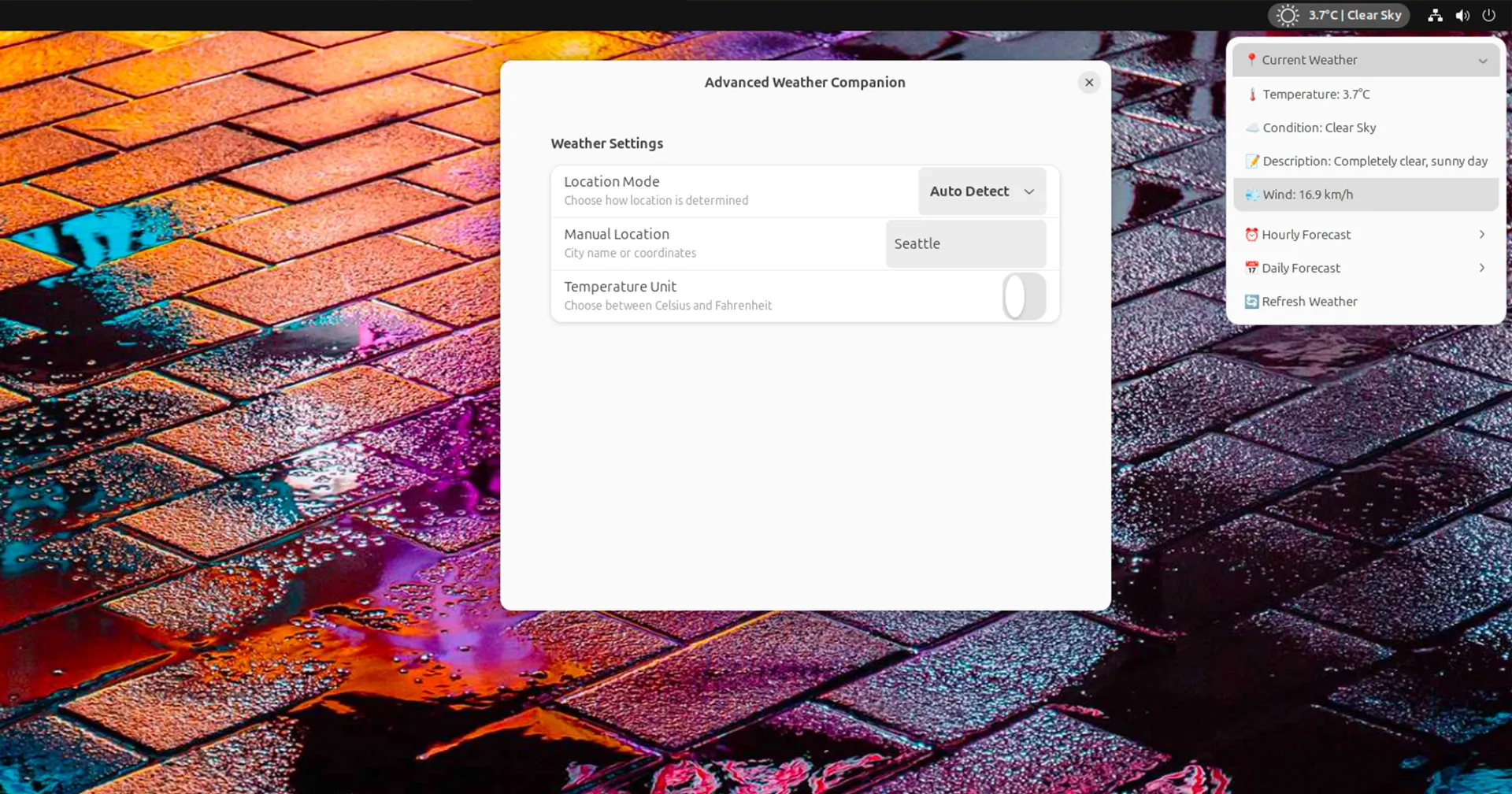
The GNOME Shell is known for its clean and efficient interface, but its built-in weather applet leaves much to be desired. Enter the Advanced Weather Companion, a powerful extension that elevates your desktop’s weather experience. This article provides a comprehensive exploration of this must-have tool for GNOME users, delving into its features, customization options, and how it compares to alternatives.
The Advanced Weather Companion is a free and open-source GNOME Shell extension that provides detailed weather information directly on your desktop.
Instead of simply displaying the current temperature, this extension offers a wealth of data, including hourly forecasts, daily outlooks, and even severe weather alerts. It’s designed for those who want more than just a basic temperature reading and prefer to stay informed about upcoming weather trends.
While the exact release date is unclear, it gained significant attention in late 2024, coinciding with GNOME Shell’s latest releases.
The Advanced Weather Companion is available for download from the official GNOME Extensions website.
Anyone using the GNOME desktop environment who wants a more informative and customizable weather experience will find this extension invaluable.
Beyond the Basics: Unpacking the Features
The Advanced Weather Companion distinguishes itself through a rich feature set that caters to various user needs. Here’s a breakdown of what makes it stand out:
- Detailed Forecasts: Go beyond simple temperature readings. Access hourly forecasts with detailed breakdowns of temperature, wind speed, precipitation, and humidity. Plan your day with confidence using the 7-day forecast, which includes daily high and low temperatures, along with expected conditions.
- Dynamic Location Detection: No need to manually enter your location. The extension automatically detects your city, providing accurate weather information relevant to your current whereabouts.
- Manual Location Override: Traveling or want to check the weather in another city? Easily override the automatic location detection and input any location manually.
- Customizable Units: Choose between Celsius and Fahrenheit for temperature display, and select your preferred units for wind speed and precipitation.
- Severe Weather Alerts: Stay informed about potentially dangerous weather conditions with alerts for storms, extreme temperatures, and other severe weather events.
- Compact and Expandable Interface: The extension seamlessly integrates into the GNOME Shell top bar. A simple click reveals a detailed dropdown menu with hourly, daily, and current condition information.
- Intuitive Settings: Easily customize the extension’s behavior through a user-friendly settings panel. Adjust update frequency, temperature units, and more to suit your preferences.
My Experience: From Skeptic to Believer
Initially, I was hesitant to add another weather extension to my already customized GNOME setup. However, the Advanced Weather Companion quickly won me over with its comprehensive information and clean presentation.
I particularly appreciate the severe weather alerts, a feature that proved invaluable during a recent unexpected thunderstorm. The ability to quickly check the hourly forecast has also become an integral part of my daily routine, helping me plan my outdoor activities more effectively.
A Cut Above the Rest: Comparing Weather Extensions
The GNOME Extensions website offers a plethora of weather extensions. So, how does the Advanced Weather Companion stack up against the competition?
- OpenWeather: A popular choice, OpenWeather provides a detailed weather display but often feels bulky and intrusive. In contrast, the Advanced Weather Companion maintains a sleek profile while offering comparable information.
- Weather or Not: This extension focuses on simplicity, displaying only the current temperature and conditions. While minimalist, it lacks the depth of information provided by the Advanced Weather Companion.
While these alternatives have their merits, the Advanced Weather Companion strikes a balance between comprehensive data and a user-friendly interface, making it a compelling option for GNOME users.
Fine-Tuning Your Forecast: Customization Options
One of the strengths of the Advanced Weather Companion lies in its customization options. Here’s a look at the key settings you can tweak:
- Update Interval: Control how often the extension fetches new weather data, ensuring you have the most up-to-date information.
- Temperature Units: Switch between Celsius and Fahrenheit to match your preference.
- Wind Speed Units: Choose from various units, including kilometers per hour, miles per hour, and knots.
- Precipitation Units: Select your preferred units for rainfall and snowfall.
- Location Settings: Override the automatic location detection and manually set your city.
- Notification Settings: Configure how you receive severe weather alerts, choosing from on-screen notifications or subtle visual cues.
Troubleshooting Tips
While generally reliable, you might encounter occasional issues with the Advanced Weather Companion. Here are some common problems and their solutions:
- Inaccurate Location: If the extension fails to detect your location correctly, try manually setting your city in the location settings.
- Missing Data: Ensure you have an active internet connection. Occasionally, the weather data provider might experience temporary outages.
- Extension Crashes: Check for updates to the extension. Compatibility issues with specific GNOME Shell versions can sometimes cause crashes.
Looking Ahead: Future Developments
The Advanced Weather Companion is actively maintained, with the developer regularly releasing updates and adding new features. Based on user feedback and recent trends, here are some potential future developments:
- More Detailed Weather Maps: Integration of interactive weather maps could provide a visual representation of weather patterns and forecasts.
- Personalized Weather Alerts: Allow users to set custom alerts based on specific weather conditions, such as high pollen counts or UV index levels.
- Improved Data Visualization: Explore innovative ways to present weather data, such as graphs and charts, to enhance user understanding.
The Advanced Weather Companion is a powerful and versatile GNOME Shell extension that elevates the desktop weather experience. Its combination of detailed forecasts, customizable settings, and user-friendly interface makes it a must-have for GNOME users seeking more than just a basic temperature display. Whether you’re a weather enthusiast or simply want to stay informed about upcoming conditions, this extension provides the tools you need to tame the elements and plan your day with confidence.